

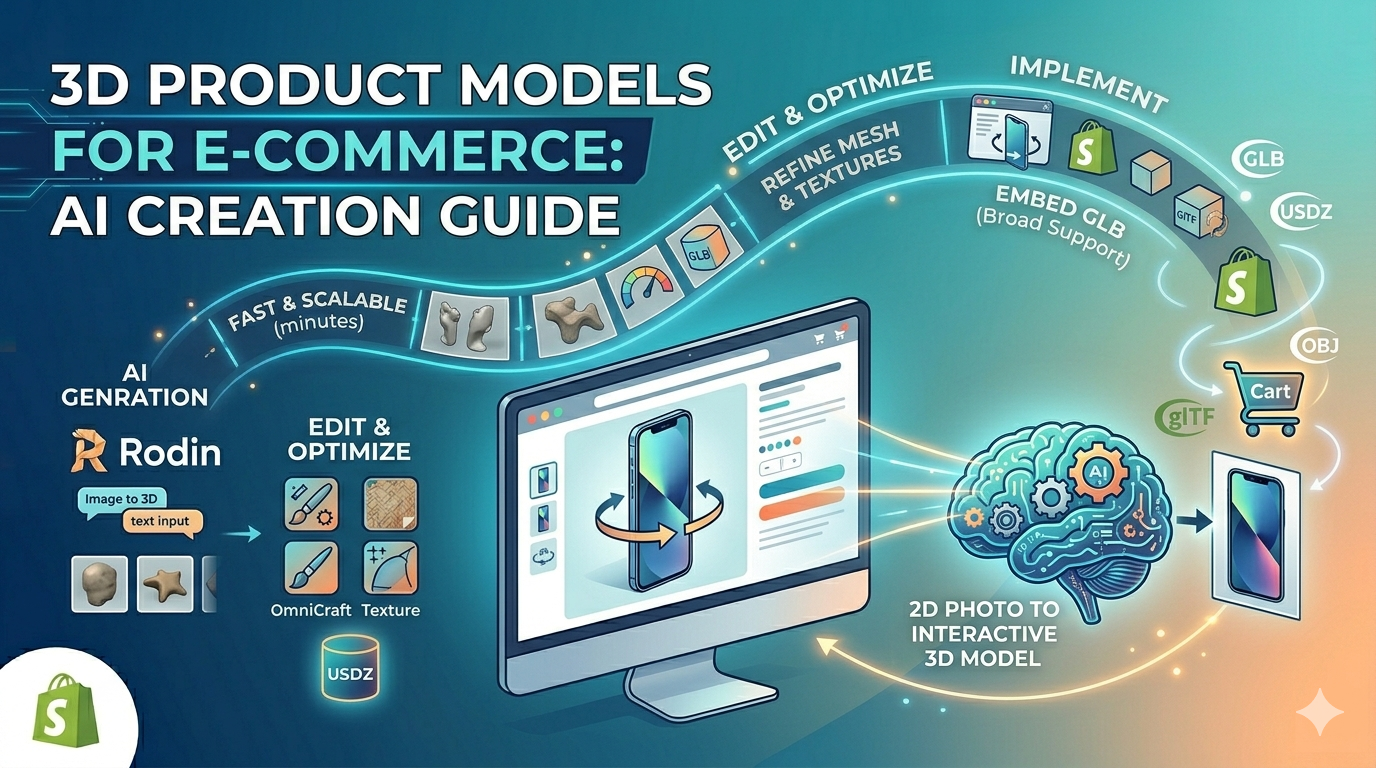
3D Product Model Ecommerce
# 3D Product Models for E-commerce: AI Creation Guide
In the competitive world of online retail, grabbing and holding a customer?? attention is everything. Standard product photos, while essential, often don?? provide the full picture. This is where the 3d product model ecommerce experience comes in, and creating a 3d product model ecommerce is easier than ever., offering a richer, more interactive way for shoppers to connect with products. While creating these models was once a complex and costly process reserved for large corporations, the field is changing rapidly. With the advent of accessible tools, including powerful AI-driven platforms like Hyper3D, businesses of all sizes can now create and showcase stunning 3D product models. This guide will walk you through how you can use this technology, from understanding the basics to implementing 3D models on your own e-commerce site.
What are 3D Product Models and Why Do They Matter for E-commerce?: 3D Product Model Ecommerce
A 3d product model ecommerce is more than just a static image; it's a key part of the modern 3d product model ecommerce strategy.; it's a fully interactive, three-dimensional representation of a product that customers can view from any angle. Think of it as bringing the in-store experience of holding and examining a product directly to the online shopper. This technology is a significant step up from flat, 2D photography and even 360-degree photo carousels.
Defining the 3D Product Model in an E-commerce Context: 3D Product Model Ecommerce
In an e-commerce setting, a 3D product model is a digital file that has been created either manually by a 3D artist or generated through software. This model can be embedded directly onto a product page, allowing a user to click, drag, and rotate the object to see it from every perspective. It provides a complete understanding of the product's shape, size, and texture in a way that traditional images cannot. This level of interaction helps bridge the gap between the digital and physical worlds, giving customers the confidence they need to make a purchase.
The Tangible Benefits of Integrating 3D Models
The impact of integrating 3D models into an e-commerce strategy is not just about aesthetics; it delivers measurable results. Studies and real-world applications have shown several key benefits:
- Increased Conversion Rates: When customers can fully explore a product, their purchase confidence skyrockets. This leads to higher conversion rates, as the guesswork is taken out of the equation. Some platforms have reported conversion rate increases of up to 94% after implementing 3D and AR viewers.
- Reduced Return Rates: A primary reason for product returns is that the item didn't meet the customer's expectations. A 3d product model for ecommerce provides a much more accurate representation of the product, a core tenet of a good 3d product model ecommerce experience., ensuring that what customers see is what they get. This accuracy significantly cuts down on costly returns.
- Enhanced Customer Engagement: Interactive content is naturally more engaging than static content. Customers spend more time on product pages with 3D models, exploring features and details. This increased engagement builds a stronger connection with the product and the brand.
- Improved Product Customization: For businesses that offer customizable products, 3D models are a perfect fit. Customers can see their customizations in real-time, from changing colors to adding accessories. This dynamic experience is a powerful sales tool.
The Process of Creating 3D Product Models for E-commerce
Historically, the creation of 3D models was a specialized skill. However, technology has made the process more accessible than ever. There are now a few different paths you can take to get a 3d product model for ecommerce.
Traditional 3D Modeling Workflow
The traditional route involves a few technical methods:
- 3D Scanning: This process uses specialized hardware to capture the geometry of a physical object, creating a digital replica.
- Photogrammetry: By taking dozens or even hundreds of photos of an object from every angle, software can stitch these images together to create a 3D model.
- Manual 3D Design: A skilled 3D artist can build a model from scratch using software like Blender, Maya, or 3ds Max, based on product photos and dimensions.
While effective, these methods can be time-consuming, expensive, and require a high level of technical expertise.
The Rise of AI in 3D Model Generation
More recently, artificial intelligence has dramatically simplified the creation of 3D models. AI-powered tools can generate a 3d product model ecommerce from a series of images or even a single photo. This is a big deal for creating 3D models. This approach is much faster and more cost-effective than traditional methods. An AI 3D model generator can analyze the input images and construct a detailed 3D mesh, apply textures, and produce a model ready for an e-commerce site in a fraction of the time. This opens up the world of 3D to businesses that previously found it out of reach.
My First-Hand Experience with AI 3D Model Generators
To get a real sense of how these AI tools work, I decided to try one out myself. I used Hyper3D?? suite of tools to create a 3D model of a product. I started with the image to 3D feature in the Rodin generator. The process was straightforward. I uploaded a high-quality photo of a product, and the AI began its work.
I experimented with a few of the generation modes. The ??efault??mode gave me a solid, well-rounded model. ??ocal??mode produced a model with enhanced details on the front-facing parts of the object, which is great for products where the front is the most important view. For a quick turnaround, ??peedy??mode generated a model in just a few minutes, which was impressive, although with slightly less detail.
Once the initial model was generated, I took it into OmniCraft, Hyper3D?? editing tool. Here, I was able to clean up the mesh, adjust the textures, and make sure the colors were accurate. The user interface was intuitive, and I didn
?? need any prior 3D modeling experience to make meaningful edits. Finally, I used the 3D format converter to export the model in GLB format, which is ideal for web use.
A Comparison of 3D Model Creation Tools
When it comes to creating a 3d product model ecommerce, there are several types of tools available, each with its own strengths and weaknesses. Here?? an objective look at some of the options:
| Tool Type | Pros | Cons | Best For |
|---|---|---|---|
| Traditional 3D Software (e.g., Blender, Maya) | Highly detailed and customizable models, complete creative control. | Steep learning curve, time-consuming, can be expensive. | Professional 3D artists and large-scale projects requiring high fidelity. |
| Photogrammetry Software (e.g., Agisoft Metashape) | Can create very realistic models from photos. | Requires a large number of high-quality photos, can be complex to process. | Products with complex textures and organic shapes. |
| AI 3D Model Generators (e.g., Hyper3D) | Fast and easy to use, no 3D modeling skills required, cost-effective. | May not have the same level of fine-tuned control as manual modeling. | E-commerce businesses looking for a quick and scalable way to create 3D models. |
For most e-commerce businesses, an AI product 3D generator offers the best balance of quality, speed, and cost. While a dedicated product design 3D tool might be necessary for complex engineering projects, AI is more than capable of producing high-quality models for a wide range of consumer products.
How to Implement 3D Product Models on Your E-commerce Site
Once you have your 3d product model ecommerce, the next step is to get it onto your website. This process is more straightforward than you might think.
Choosing the Right File Format (STL, FBX, OBJ, GLB, USDZ)
The file format you choose will depend on where and how you want to display your model. Here?? a quick rundown of the most common formats:
- GLB: This is the most common format for web-based 3D viewers. It?? a binary file that contains everything the model needs to render, including textures and animations. It's the recommended format for most e-commerce platforms.
- USDZ: This format was developed by Apple and is used for AR experiences on iOS devices.
- OBJ: A widely supported format, but it often requires a separate file for textures.
- FBX: A versatile format that supports animations and is often used in game development and VFX.
- STL: Primarily used for 3D printing.
For e-commerce, GLB is almost always the best choice due to its efficiency and broad support.
Embedding 3D Models into Your Product Pages
Most modern e-commerce platforms, such as Shopify, have built-in support for 3D models. The process is usually as simple as uploading the GLB file to your product media, just as you would with an image. The platform will then automatically generate an interactive 3D viewer on your product page.
If your platform doesn?? have native support, there are many third-party plugins and services that can embed a 3D viewer for you. These services often provide additional features, such as AR viewing and advanced customization options.
Frequently Asked Questions (FAQ)
How much does it cost to create a 3d product model for ecommerce?
The cost can vary widely. Traditional methods can range from hundreds to thousands of dollars per model. AI-powered solutions have made it much more affordable, with some platforms offering subscription plans or pay-per-model options that are a fraction of the cost of manual creation.
How long does it take to create a 3d product model for ecommerce?
Again, this depends on the method. A complex model created by a 3D artist could take days or even weeks. An AI generator can produce a model in a matter of minutes to a few hours.
What are the best platforms for creating 3d product models for ecommerce?
For businesses looking for an efficient and user-friendly solution, platforms like Hyper3D are an excellent choice. For those with more technical expertise and a need for highly detailed models, traditional software like Blender or Maya may be more suitable.
Can I turn my existing product photos into 3D models?
Yes! This is one of the biggest advantages of AI 3D model generation. Tools like Hyper3D?? image to 3D feature are specifically designed to do this.
Do I need to be a 3D artist to create 3d product models for ecommerce?
Not anymore. While a background in 3D art is helpful for advanced customization, AI has made it possible for anyone to create a high-quality 3d product model for ecommerce without any prior experience.