

Free Text to 3D Model Tools: A Full Comparison for 2025
Turning a simple text description into a detailed 3D model is no longer science fiction. AI-powered free text to 3D model generators are becoming more accessible, allowing creators, designers, and hobbyists to bring their ideas to life without needing complex 3D modeling software. These tools interpret your words and generate a 3D asset, opening up new possibilities for game development, 3D printing, and digital art.
As the technology has matured, a variety of platforms have emerged, each with its own strengths and weaknesses. Some are designed for rapid prototyping, while others focus on creating high-quality, production-ready assets. Choosing the right tool depends on your specific needs, budget, and technical expertise. In this guide, we'll compare some of the most popular free text to 3D model tools available today, helping you find the best fit for your creative projects.
We'll look at the pros and cons of each platform, their ideal use cases, and what you can expect from their free offerings. Whether you're a seasoned 3D artist or just starting, this comparison will provide a clear overview of the current landscape and help you get started with AI-powered 3D creation.
What is Text-to-3D and How Does It Work?
Text-to-3D is a generative AI technology that creates a three-dimensional model from a user-provided text prompt. The process relies on complex algorithms and neural networks trained on vast datasets of 3D shapes and their corresponding text descriptions. When you input a prompt like "a red armchair with wooden legs," the AI model uses its training to generate a 3D model that matches that description.
The Technology Behind the Magic
Most text-to-3D generators use a diffusion model. This process starts with a random cloud of points or a noisy 3D shape and gradually refines it, step-by-step, to match the input prompt. The AI has learned the relationship between words and shapes, allowing it to sculpt the initial noise into a coherent 3D object. Some models also generate a series of 2D images from different angles and then stitch them together to create the final 3D model.
From Prompt to Polygon
The quality of the output depends heavily on the training data and the sophistication of the AI model. Early text-to-3D models often produced rough, low-polygon shapes, sometimes referred to as "triangle soup." However, the latest generation of tools can create models with clean topology, detailed textures, and PBR (Physically Based Rendering) materials, making them suitable for a wide range of applications.
Top Free Text to 3D Model Tools Compared
With a growing number of text-to-3D tools available, it can be challenging to know where to start. Here?? a comparison of some of the leading platforms that offer free access, highlighting their strengths and weaknesses.
Meshy AI
Meshy AI is known for its polished user interface and excellent texturing capabilities. It's a versatile platform that caters to both beginners and professionals.
- Pros: Best-in-class texturing engine, intuitive UI, good for creating stylized assets (e.g., voxel, low-poly).
- Cons: The geometry of the generated models can sometimes be less refined, especially for complex objects.
- Best for: Artists and designers who prioritize high-quality textures and a smooth user experience.
Tripo AI
Tripo AI is a fast and efficient tool that's particularly popular among game developers. It offers features like auto-rigging, which can be a significant time-saver.
- Pros: Very fast generation, built-in auto-rigging and segmentation, generous free credits.
- Cons: Exported STL files can sometimes have issues with normals, and it's less specialized for creating realistic avatars.
- Best for: Game developers who need to create pipeline-ready assets quickly.
Hyper3D (Rodin)
Hyper3D's Rodin engine is praised for its ability to generate models with clean topology, making it a strong choice for character and avatar creation.
- Pros: Excellent geometry quality, an all-in-one ecosystem with the OmniCraft Suite for post-generation editing, and multi-view input support. As a Gold Enterprise Sponsor of Blender, Hyper3D is committed to supporting the open-source 3D community.
- Cons: It's more specialized for characters and avatars, so it might be less versatile for stylized background props.
- Best for: Users who need high-quality geometry, especially for character models, and want an integrated workflow for editing and texturing. The AI text to 3D tool is a great starting point.
Other Notable Tools
- Luma AI (Genie): Great for rapid prototyping and generating initial concepts quickly. The models are not always production-ready and may require cleanup in a tool like Blender.
- Sloyd: Excellent for creating simple, stylized game props with clean, parametric geometry.
| Tool | Best For | Top Strength | Key Limitation |
|---|---|---|---|
| Meshy AI | Texturing & UX | Best textures | Rougher geometry |
| Tripo AI | Game dev pipelines | Auto-rigging | STL export issues |
| Hyper3D | Topology & ecosystem | Cleanest geometry | Less versatile for stylized props |
| Luma AI | Rapid prototyping | Speed | "Triangle soup" topology |
| Sloyd | Simple game props | Parametric generation | Limited to simpler objects |
My First-Hand Experience with Hyper3D Rodin
To get a better feel for how these tools work, I took Hyper3D's Rodin for a spin. I accessed the AI 3D generator through their website. The user interface is clean and straightforward, with a dark-themed workspace and a central area for the generated model. On the left, there's a panel for inputting prompts and selecting different generation modes.
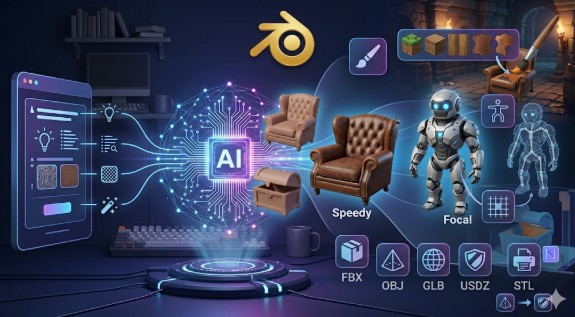
I tested a few prompts, starting with "a vintage leather armchair." I tried both the "Speedy" and "Focal" generation modes. The Speedy mode produced a result in under a minute, which was impressive. The model was a good starting point, but the details were a bit soft. The Focal mode took a little longer but delivered a much more refined model with sharper details and more accurate textures.
Next, I tried a more complex prompt: "a sci-fi robot with glowing blue eyes." The result was surprisingly good, with clean lines and a well-defined shape. After generation, I explored the OmniCraft sidebar tools. I used the AI Texture Generator to apply a metallic material to the robot, which was a simple and intuitive process. I also checked the export options and was pleased to see a wide range of formats, including FBX, OBJ, GLB, and USDZ, which are compatible with most 3D software and game engines.
Step-by-Step Guide to Creating a 3D Model from Text
Getting started with a free text to 3D model generator is easier than you might think. Here?? a general workflow that applies to most platforms:
1. Write a Clear Prompt: The more descriptive your prompt, the better the result will be. Include details about the object's shape, color, material, and style.
2. Choose Your Settings: Select the generation mode, quality level, and any other options available on the platform.
3. Generate the Model: Click the generate button and wait for the AI to work its magic.
4. Review and Refine: Once the model is generated, review it from all angles. If it's not quite right, you can often refine it by adjusting the prompt or using the platform's editing tools.
5. Export the Model: When you're happy with the result, export it in a format that's compatible with your intended use case. For example, you might use an OBJ-to-USDZ converter for AR applications.
Common Use Cases for Text-to-3D Models
Text-to-3D technology is already being used in a variety of industries:
- Game Development: Quickly create props, characters, and environmental assets.
- 3D Printing: Generate unique models for printing, from custom figurines to functional parts.
- AR/VR: Populate virtual worlds with a wide range of 3D objects.
- Product Design: Rapidly prototype new product ideas and visualize concepts.
- Education: Create engaging 3D content for educational apps and experiences.
FAQ
What is the best free text to 3D model generator?
There's no single "best" tool, as it depends on your needs. For the cleanest geometry, especially for characters, Hyper3D is a strong contender. For the best textures, Meshy AI is often recommended. For game developers who need a fast workflow, Tripo AI is a great choice.
Can I use the generated 3D models for commercial projects?
This depends on the platform's terms of service. Most free plans have limitations on commercial use, so be sure to check the licensing agreement before using a model in a commercial project.
How detailed can the generated models be?
The level of detail has improved significantly. While early models were often simplistic, the latest tools can generate high-polygon models with PBR textures and intricate details.
Do I need a powerful computer to use these tools?
No, most text-to-3D generators are cloud-based, so all the heavy processing is done on their servers. You can use them from any modern web browser.
What file formats are supported?
Most platforms support a range of common 3D file formats, including OBJ, FBX, GLB, STL, and USDZ. This makes it easy to import the models into other 3D software or game engines. You can also use tools like an FBX-to-OBJ converter if needed.