Video to 3D Model: AI Reconstruction Explained
# Video to 3D Model: AI Reconstruction Explained
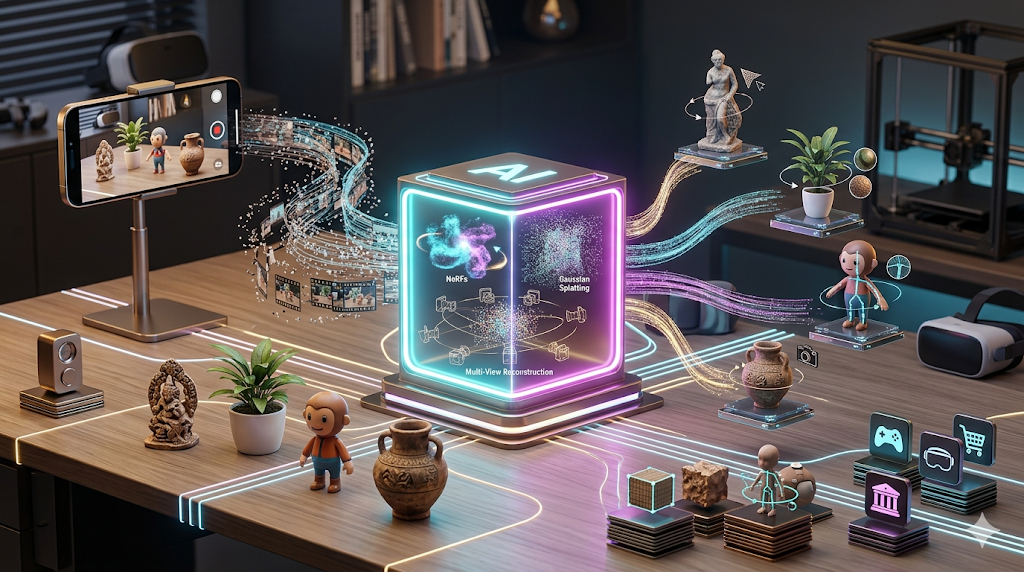
Turning a simple video into a detailed 3D model once sounded like science fiction, but it's now a practical reality thanks to advances in AI. This technology, often called videogrammetry or video-to-3D, allows creators to capture an object from all angles with a phone camera and convert it into a digital 3D asset. The process is becoming a cornerstone of workflows in game development, augmented reality, and digital art, offering a much faster alternative to manual 3D modeling.
Multiple platforms have emerged to tackle this challenge, each with its own approach. Some, like Luma AI, are known for their speed, while others, such as 3Dpresso, focus on a streamlined web-based experience. The underlying technology is evolving rapidly, with methods like NeRFs and Gaussian Splatting pushing the boundaries of quality and realism. This guide explores how video to 3D model technology works, compares the top tools available, and walks through a hands-on test to show you what to expect.
## How AI Turns Video into 3D Models
The magic of converting video to a 3D model relies on a technique broadly known as photogrammetry, but with a modern, AI-powered twist. The AI analyzes dozens or hundreds of frames from your video, identifying consistent features on the object from different angles. It then calculates the object's shape and texture in 3D space. Three key technologies are driving this forward.
### Neural Radiance Fields (NeRF)
NeRF is an AI technique that excels at creating a photorealistic 3D representation of a scene. Instead of building a traditional mesh of polygons, a NeRF learns how light radiates from every point in space. It uses a neural network to predict the color and density of any point from any viewing angle. The result is a stunningly realistic 3D scene that feels more like a hologram, though it can be more difficult to edit with traditional 3D software.
### 3D Gaussian Splatting
A more recent and often faster technique is 3D Gaussian Splatting. Instead of a continuous field like NeRF, this method represents the scene as millions of tiny, semi-transparent particles (Gaussians). Each particle has a position, shape, and color. This approach allows for real-time rendering and easier editing, as the "splats" can be more directly manipulated than a NeRF's implicit representation. It strikes a balance between the realism of NeRFs and the editability of traditional meshes.
### Multi-View Reconstruction
This is a more traditional photogrammetry approach that many AI tools build upon. The software tracks features across multiple video frames to estimate camera positions and reconstruct a 3D point cloud of the object. From there, it generates a polygonal mesh, which is the standard format used in most 3D applications. Platforms like Hyper3D have refined this approach to work without needing pre-calibrated camera setups, making it accessible to anyone with a smartphone.
## Top Video to 3D Model Tools Compared
Choosing the right tool depends entirely on your project's needs??peed, quality, and final use case are all important factors. Here?? a breakdown of the leading platforms.
| Tool | Best For | Top Strength | Key Limitation |
|---|---|---|---|
| Luma AI | Rapid Prototyping | Very fast generation | "Triangle soup" topology requires cleanup |
| 3Dpresso | Web-Based Simplicity | Easy to use, no software needed | Quality can be less consistent |
| Hyper3D | Clean Topology & Avatars | Excellent geometry and all-in-one workflow | More specialized for characters and objects |
| Tripo AI | Game Developers | Fast, with auto-rigging features | STL exports can have issues |
| Meshy AI | High-Fidelity Texturing | Best-in-class texture generation | Geometry can be rough on complex shapes |
## My First-Hand Experience with Hyper3D
To see how this works in practice, I tested the process using Hyper3D's Rodin AI. The goal was to take a short video of a real-world object and see what kind of 3D asset I could get. Upon logging in, I was met with a clean, dark-themed workspace. The main area prompts you to upload your media, while the OmniCraft sidebar on the left provides access to post-generation tools like the AI Texture Generator and a mesh editor.
I recorded a 30-second, 4K video of a decorative sculpture, slowly orbiting it to capture all sides. I uploaded the video directly. After a short processing time, the big GENERATE button lit up. I decided to test two of the available generation modes: Speedy and Focal. The Speedy generation was incredibly fast, producing a usable model in under a minute. The geometry was decent, but some of the finer details were softened. The Focal generation took a few minutes longer but delivered a noticeably sharper model with much cleaner topology, which is exactly what you'd want for a hero asset. After generation, I was able to export the model directly as a GLB file, ready for use in other applications.
## A Simple Step-by-Step Workflow
Creating a 3D model from video follows a straightforward process, regardless of the tool you choose.
1. Record Your Video: The key to a good 3D model is a good video. Orbit your object slowly and steadily, ensuring every part of it is visible in the frame. Avoid shaky movements and maintain consistent lighting. A 30-60 second clip is usually sufficient.
2. Upload and Process: Upload your video file to your chosen platform. The AI will first need to analyze the footage and extract still frames. This step is usually automatic.
3. Generate the Model: Initiate the generation process. Many tools, including Hyper3D's AI 3D model generator, offer different modes that trade speed for quality. Choose the one that best fits your needs.
4. Refine and Texture: Once the base model is generated, you may want to clean it up. Tools like Hyper3D's OmniCraft suite allow you to apply an AI Texture Generator or make small mesh adjustments directly in the browser.
5. Export the Final Asset: Finally, export your model in a format compatible with your target application. Common formats include GLB, FBX, and OBJ. For augmented reality, you might use a GLB-to-USDZ converter.
## Use Cases and Applications
The ability to quickly create 3D assets from video opens up numerous creative and commercial possibilities, streamlining production pipelines and unlocking new forms of digital interaction.
* Game Development: Indie developers and large studios alike can rapidly create realistic game assets by capturing real-world objects, reducing modeling time from days to minutes. This process, known as photogrammetry, allows for a level of detail and realism that is difficult to achieve by hand, especially for organic objects like rocks, trees, and terrain. The resulting assets can be quickly optimized and integrated into game engines like Unity and Unreal Engine.
* E-commerce and Marketing: Brands can create interactive 3D product viewers for their websites, allowing customers to inspect items from every angle, which has been shown to improve conversion rates. Instead of relying on static images, shoppers can rotate, zoom, and see products in a more tangible way, leading to higher engagement and fewer returns. This is especially powerful for products with complex designs or important physical details.
* Augmented and Virtual Reality: Content creators can bring real-world objects into AR and VR experiences, creating more immersive and believable digital worlds. Imagine pointing your phone at a museum artifact and seeing a 3D model of it appear in your room, complete with historical context. This technology is fundamental to building the spatial computing experiences of the future.
* Digital Preservation: Museums and cultural institutions can digitize artifacts, creating virtual archives that are accessible to a global audience. This not only protects priceless historical objects from physical degradation but also democratizes access to cultural heritage. Researchers and students can study intricate objects in high detail from anywhere in the world.
* Visual Effects: Filmmakers can use video-to-3D to generate digital doubles of props or environments for VFX shots, and some tools even function as an AI Video Generator to create animated scenes. This allows for seamless integration of computer-generated imagery with live-action footage, as the digital assets perfectly match the lighting and texture of their real-world counterparts.
## Frequently Asked Questions
### What is the best AI for video to 3D model?
There is no single "best" tool; it depends on your goal. For the highest quality geometry and cleanest topology, especially for characters, Hyper3D is a top choice. If you need extremely fast results for quick prototyping, Luma AI is excellent. For the best texturing results on a model, Meshy AI often leads the pack.
### How is this different from an image to 3D model process?
Video-to-3D uses motion and multiple perspectives from a video to build the model, which often captures the object's full geometry more reliably. An image to 3D model generator reconstructs the object from a single picture, which is faster but may have to infer the object's hidden sides. Multi-view reconstruction, which uses several photos, closes the gap between the two.
### Do I need an expensive camera for this?
No. Modern smartphone cameras are more than capable of capturing high-quality video suitable for AI reconstruction. The key is not the camera's price but the technique: shoot in good, even lighting and move smoothly and slowly around the object.
### What is the difference between NeRF and traditional photogrammetry?
Traditional photogrammetry produces a polygonal mesh (made of vertices, edges, and faces), which is the standard for most 3D work. A NeRF creates a volumetric scene representation that is often more photorealistic but can be harder to edit in software like Blender. Gaussian Splatting offers a middle ground, providing high realism with better performance and editability.
### How long does it take to generate a 3D model from video?
This varies widely by platform and quality settings. A tool like Tripo AI or Luma AI can produce a preview in under a minute. A higher-quality generation on a platform like Hyper3D might take 5-10 minutes. The length and resolution of your source video also play a role, with longer, higher-resolution videos requiring more processing time.
Frequently Asked Questions (FAQ)
Is Video To 3D Model suitable for beginners?
Yes. Most modern video to 3d model tools run in the browser and require no prior 3D experience. Platforms like Hyper3D, Meshy, and Tripo are all designed with beginners in mind.
What file formats work with Video To 3D Model tools?
The standard set includes STL, FBX, OBJ, GLB, and USDZ. This covers 3D printing, game engines, AR applications, and professional 3D software.
Can I use Video To 3D Model results commercially?
Yes. Most paid platforms including Hyper3D, Meshy, and Tripo allow commercial use. Always check the specific licensing terms for your chosen platform.
How much does Video To 3D Model cost?
Pricing varies. Hyper3D and Meshy offer free credits for new users. Hunyuan3D provides 20 free generations daily. Paid plans start around $10-20/month for most platforms.
What hardware do I need for Video To 3D Model?
Most AI-based video to 3d model tools are cloud-based and run in your browser, so you don't need a powerful GPU. A stable internet connection and a modern browser are all you need.