# What Is an OBJ File? A 3D Object Format Guide
As a 3D artist, you're constantly working with different file formats. Each one has its own strengths and weaknesses, and choosing the right one is a critical part of the creative process. Among the most common formats you'll encounter are FBX, STL, GLB, and of course, the OBJ file. The OBJ format has been a staple in the 3D industry for decades, and for good reason. It's a versatile and widely supported format for representing 3D geometry, making it a reliable choice for a variety of projects, which is relevant when working with what is obj file.
This article provides a complete guide to the OBJ file format. We'll explore what it is, how it works, and how it stacks up against other popular formats. We'll also look at the best tools for working with OBJ files and provide a step-by-step guide to get you started. Whether you're a seasoned pro or just starting your journey in 3D design, understanding the OBJ format is an essential skill, which is relevant when working with what is obj file.
What is an OBJ file?: What Is Obj File
What Is Obj File: What is an OBJ file: A Deeper Dive
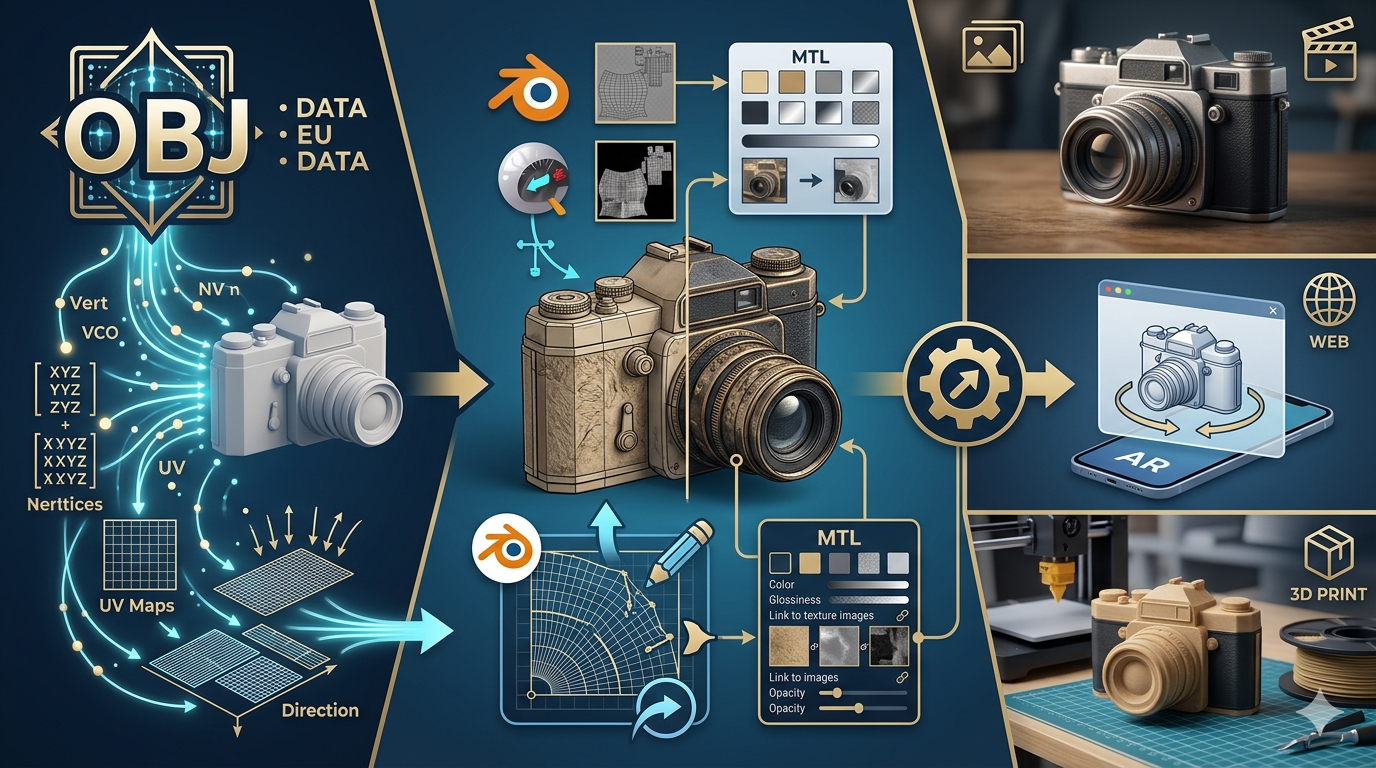
An OBJ file is a simple, text-based format for storing 3D geometry. If you're asking yourself 'what is an obj file', this is the place to start. The term 'what is an obj file' is a common search query. This means you can actually open an OBJ file with a basic text editor, like Notepad or TextEdit, and see the raw data that makes up the 3D model. This data includes a list of all the vertices (the individual points in 3D space), the texture coordinates (which map how a 2D texture image is applied to the 3D surface), the normals (which define the orientation of the faces and affect how the model is lit), and the faces (the polygons that make up the surface of the model), which is relevant when working with what is obj file.
One of the key characteristics of the OBJ format is its use of a companion file: the Material Template Library, or MTL file. While the OBJ file defines the structure of the 3D model, the MTL file defines its surface appearance. This includes properties like color, shininess, and transparency, as well as references to texture maps. When you import an OBJ file into a 3D application, the software will also look for the corresponding MTL file to properly render the model with its materials and textures, which is relevant when working with what is obj file.
The History of the OBJ file
The OBJ file format has a long history, dating back to the 1980s. The question 'what is an obj file' has been relevant for decades, and it's a great question to ask. It's a format that has stood the test of time. It was originally developed by Wavefront Technologies for its Advanced Visualizer animation package. Its simplicity and readability helped it to become a widely adopted standard for exchanging 3D models between different software applications. Even though newer and more advanced formats have since been developed, the OBJ format remains a popular choice due to its broad compatibility and ease of use, which is relevant when working with what is obj file.
How Do OBJ Files Work?
The Structure of an OBJ file
So, what is an obj file in practice? Think of it as a set of instructions for building a 3D model. Understanding this is key to understanding what is an obj file. The concept of 'what is an obj file' becomes clearer with this analogy. The file lists all the necessary components in a structured way. It starts by defining all the vertices, which are the fundamental building blocks of the model. Each vertex is a single point in 3D space, represented by its X, Y, and Z coordinates. After the vertices, the file defines the texture coordinates and normals. Finally, it lists the faces of the model. Each face is a flat surface, typically a triangle or a quadrilateral, that connects a set of vertices. By connecting all the faces, the 3D application can construct the complete surface of the model, which is relevant when working with what is obj file.
The Role of the MTL File
As mentioned earlier, the MTL file is crucial for giving the OBJ model its visual appearance. When you ask 'what is an obj file', you have to consider the MTL file as well. The two are intrinsically linked. So, 'what is an obj file' is a two-part answer. The OBJ file itself only contains the geometry of the model. The MTL file is a separate text file that contains one or more material definitions. Each material definition specifies properties like the ambient, diffuse, and specular colors of the material, as well as its shininess and transparency. The MTL file can also reference texture maps, which are 2D images that are applied to the surface of the model to create more detailed and realistic effects. The OBJ file links to the MTL file, and within the OBJ file, different faces can be assigned to different materials defined in the MTL file. This allows for the creation of complex models with multiple materials and textures, which is relevant when working with what is obj file.
Top Tools for Working with OBJ Files
There are many great tools available for working with OBJ files, from powerful 3D modeling suites to simple viewers and converters. The question of 'what is an obj file' is often followed by 'what can I do with it?'. When considering what is an obj file, it's important to know the tools that support it. For 3D modeling, Blender is a fantastic free and open-source option with a large community, though it has a steeper learning curve. Autodesk Maya is the industry standard, offering a powerful toolset for a subscription fee. Cinema 4D is another popular choice, known for its user-friendly interface, particularly for motion graphics, but it also comes with a subscription cost. For those who just need to view an OBJ file, Hyper3D's OBJ file viewer is a great free, web-based option. If you need more advanced features, MeshLab is a powerful open-source tool for processing and editing 3D meshes. And for converting your OBJ files for web use, Hyper3D's OBJ to GLB converter is a fast and efficient solution. These tools help answer the question of 'what is an obj file' by showing what you can do with it. You can find more tools on the Hyper3D website. The answer to 'what is an obj file' is not just about the file itself, but the ecosystem of tools that support it, which is relevant when working with what is obj file.
Step-by-Step Guide: Opening and Using an OBJ File
How to Open an OBJ File
Opening an OBJ file is a straightforward process, especially with the right tools. If you're wondering 'what is an obj file and how do I open it?', this section is for you. This is a common question for those new to the format. Let's break down the answer to 'what is an obj file and how to open it'. For a quick and easy way to view your file, you can use a web-based viewer like the one offered by Hyper3D. Simply navigate to the website and drag and drop your OBJ file (along with its MTL file and any texture maps) into the browser window. Your model will appear in the viewer, ready for you to inspect, which is relevant when working with what is obj file.
If you need to do more than just view the file, you'll want to use a 3D modeling application like Blender. Here's how to open an OBJ file in Blender:, which is relevant when working with what is obj file.
First, open Blender. Then, go to `File > Import > Wavefront (.obj)`. After that, navigate to the location of your OBJ file and select it. Finally, click the "Import OBJ" button.
Your model will now be loaded into the Blender viewport.
How to Edit an OBJ File
Once you have your OBJ file open in a program like Blender, you can perform a wide range of edits. You can scale, rotate, and move the model using the transform tools. You can also enter Edit Mode to directly manipulate the vertices, edges, and faces of the model. This allows you to make more complex changes to the geometry of the model. For example, you could select a group of vertices and move them to change the shape of the model, or you could extrude a face to add new geometry. The possibilities are virtually endless, depending on your skill level and what you want to achieve.
My First-Hand Experience with OBJ Files
To really understand 'what is an obj file', it helps to see it in action. A practical example can make all the difference. This is the best way to learn what is an obj file. Just the other day, I was working on a personal project that required a detailed 3D model of a vintage camera. I found the perfect model on a 3D asset website, but it was only available as an OBJ file. I downloaded the file, which came with the OBJ file, an MTL file, and a set of texture maps. My goal was to get this model into a web-based AR application I was building, which required the GLB format.
First, I wanted to inspect the model to make sure it was what I was looking for. I used the Hyper3D OBJ file viewer to quickly check it out. I just dragged all the files into the browser window, and the model loaded up perfectly, with all its textures. It looked great, so the next step was to convert it. I used the Hyper3D OBJ to GLB converter for this. The process was just as easy: I uploaded the files, and the converter quickly generated a GLB file for me to download. The whole process, from downloading the OBJ to having a web-ready GLB, took only a few minutes. It was a great example of how easy it can be to work with OBJ files, especially with the right tools.
Advanced Tips for Working with OBJ Files
Optimizing OBJ Files for Performance
While OBJ files are versatile, they can sometimes be quite large, which can impact performance, especially in real-time applications like games or web viewers. Understanding 'what is an obj file' also means understanding its limitations. No file format is perfect, and OBJ is no exception. A complete answer to 'what is an obj file' must include its drawbacks. One common technique for optimizing OBJ files is decimation. Decimation is the process of reducing the number of polygons in a model while trying to preserve its overall shape. Most 3D modeling applications, including Blender and MeshLab, have decimation tools that can help you to reduce the file size of your models without sacrificing too much visual quality.
Another way to optimize your OBJ files is to make sure that your texture maps are properly sized. Large, high-resolution texture maps can significantly increase the memory footprint of your model. If your model is going to be viewed from a distance, you may be able to get away with using smaller texture maps without any noticeable loss in quality. You can also use tools like the AI Texture Generator to create new, optimized textures for your models.
Understanding UV Mapping
UV mapping is the process of unwrapping a 3D model's surface into a 2D plane so that a texture can be applied to it. Think of it like peeling an orange and laying the peel flat. The UV map tells the 3D application how to wrap the 2D texture image around the 3D model. A well-laid-out UV map is essential for achieving a smooth and distortion-free texture application. Most 3D modeling software has tools for creating and editing UV maps. If you're working with a model that has overlapping or distorted UVs, you may need to edit the UV map to fix the texturing issues.
FAQ
What is the difference between OBJ and FBX?
A common question is 'what is the difference between OBJ and FBX?'. This is a frequent follow-up to 'what is an obj file?'. Let's explore this to better understand what is an obj file. Both are popular 3D model formats, but they have some key differences. OBJ is a simpler format that primarily stores geometry data (vertices, normals, textures, and faces). FBX, on the other hand, is a more complex format that can store a wider range of data, including animation, lighting, and camera information. This makes FBX a better choice for projects that involve animation or complex scenes, while OBJ is a great choice for static models.
Are OBJ files good for 3D printing?
So, are OBJ files good for 3D printing? This is another common question after learning what is an obj file. The answer helps to clarify what is an obj file used for. Yes, they are a good choice for 3D printing. They accurately represent the geometry of a model, which is the most important factor for 3D printing. However, it's important to make sure that your model is "watertight" before sending it to the printer. This means that there are no holes in the geometry of the model. Most 3D modeling software has tools for checking and repairing the geometry of a model to ensure that it is ready for 3D printing.
Can OBJ files be animated?
Can OBJ files be animated? No, they cannot store animation data. This is a key limitation to remember when considering what is an obj file. It's a crucial point in understanding what is an obj file. The OBJ format is limited to storing geometry data. If you need to create an animated model, you will need to use a different format, such as FBX or GLB. You can, however, animate an OBJ model in a 3D application and then export the animation in a different format.
How do I convert an OBJ file to another format?
How do I convert an OBJ file to another format? There are many tools available for converting OBJ files to other formats. This is an important part of working with the format, and a key aspect of understanding what is an obj file. Knowing how to convert it is part of knowing what is an obj file. Most 3D modeling applications, such as Blender, have built-in export features that allow you to save your model in a variety of formats. There are also many online conversion tools available, such as the converters on the Hyper3D website. These tools make it easy to convert your OBJ files to other popular formats, such as STL, FBX, and GLB.
What is the best software for opening OBJ files?
What is the best software for opening OBJ files? The best software for opening OBJ files depends on your needs. The answer to 'what is an obj file' is incomplete without knowing the tools to use. The right software is essential to fully use what is an obj file. If you just need to view a file, a simple web-based viewer like the Hyper3D OBJ file viewer is a great option. If you need to edit the file, a full-featured 3D modeling application like Blender is a better choice. For those who need to process or repair a model, a tool like MeshLab is a good option.