

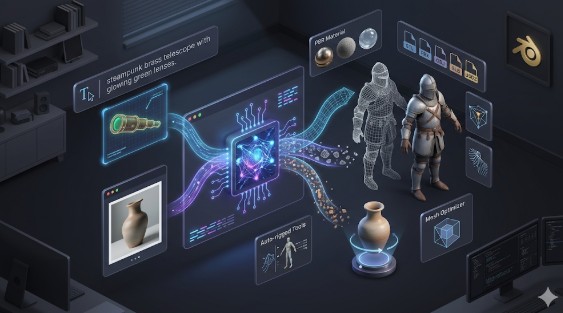
AI 3D Model Generator: Complete Guide 2026
Building 3D models used to be slow, expensive, and reserved for people who'd spent years learning specialized software. That's not the reality anymore. An AI 3D model generator can take a text description or a photo and turn it into a fully textured 3D object in seconds ??no sculpting, no UV mapping, no late nights wrestling with topology.
This shift matters whether you're an indie game developer filling out a world, a product designer who needs quick prototypes, or an e-commerce team building interactive 3D views for your catalog. The tools have gotten good enough that they're showing up in real production pipelines, not just tech demos.
This guide walks through how these generators actually work, which platforms are worth using, and how to get the best results out of them.
What Are AI 3D Model Generators and How Do They Work?
An AI 3D model generator is software that uses machine learning to build three-dimensional objects automatically. You give it an input ??either a text prompt or an image ??and it handles the geometry, textures, and structure. These systems have been trained on millions of 3D shapes, so they've learned what objects look like from every angle and how surfaces should behave under different lighting conditions.
From Text to Texture: How Generative AI Builds 3D
The process depends on your input type. With text, you describe what you want ??say, "a medieval knight's sword with glowing runes" ??and the AI parses the language, figures out the shape and materials, and builds a 3D mesh to match. With an image, the AI reads the visual information, estimates depth and volume for the parts it can't see, and reconstructs the full object in 3D.
Either way, the AI also generates texture maps ??the color and material information that gets wrapped around the geometry. The output is a complete asset you can download and use, not just a wireframe.
Why AI in 3D Design is a Big Deal
The reason this matters is speed. A task that used to take a skilled artist several hours ??or days, for complex objects ??now takes seconds. That changes the math on everything. Solo developers can build games with hundreds of unique props. Product teams can prototype ten variations before lunch. Studios can generate placeholder assets instantly and refine the ones that work. The bottleneck has shifted from "can we make this?" to "which version do we like best?"
Top AI 3D Model Generators Reviewed
Several strong platforms have emerged, each with a different focus. Some excel at rapid prototyping, others at texturing, and some are built specifically for game engines. Here is an objective look at the best AI 3D model generators currently available.
Meshy AI: The Texturing Specialist
Meshy is widely considered one of the best tools for texturing and stylized generation.
- Pros: It features an incredibly polished user interface and an excellent library of art styles. If you need a specific aesthetic (like low-poly or voxel) or want to apply high-quality textures to an existing model, Meshy is hard to beat.
- Cons: When generating complex hard-surface objects from scratch, the underlying geometry can sometimes be lower quality than competitors. It also tends to be slightly more expensive per generation.
- Best for: Artists looking for a polished UX and top-tier texturing capabilities, especially for stylized assets.
Tripo AI: The Game Developer's Choice
Tripo AI focuses heavily on speed and getting assets ready for production pipelines.
- Pros: It is exceptionally fast and is one of the few tools built specifically with technical artists in mind. It includes built-in AI auto-rigging, making character models immediately animatable in engines like Unity or Unreal.
- Cons: It is less specialized for creating hyper-realistic human avatars compared to tools like Rodin, and some users report occasional issues with STL exports for 3D printing.
- Best for: Game developers who need to generate rigged, engine-ready assets quickly.
Hyper3D (Rodin): The High-Fidelity Ecosystem
Hyper3D's AI 3D model generator runs on the Rodin Gen-2 engine, focusing on high-quality topology and a connected post-generation workflow.
- Pros: It produces very clean, sharp geometry and excels at character avatars. Its biggest strength is the OmniCraft suite ??you can generate a model, run it through the AI Texture Generator, optimize it, and prep it for printing with the Image-to-STL converter without leaving the browser. It is also a Gold Enterprise Sponsor of Blender.
- Cons: Because it focuses heavily on high-fidelity geometry, it can sometimes be less versatile for generating quick, abstract background props compared to Meshy.
- Best for: Creators who prioritize clean topology, character models, or want an all-in-one ecosystem for generation and editing.
Luma AI (Genie): The Rapid Prototyper
Luma AI was one of the early pioneers in the space and remains a popular choice for rapid ideation.
- Pros: It generates models incredibly fast, making it excellent for "sketching" ideas in 3D or blocking out levels early in development.
- Cons: The output topology is often irregular (sometimes called "triangle soup"), meaning it almost always requires manual cleanup in external software before it can be rigged or animated.
- Best for: Concept artists and level designers who need quick 3D sketches where structural perfection isn't required.
My First-Hand Experience with Hyper3D's Generation Tools
I've spent considerable time pushing Hyper3D's Rodin engine to see where it excels. The interface itself is refreshing ??it's a dark, uncluttered workspace that doesn't bury you in menus. When I tested the text-to-3D feature, I threw a fairly complex prompt at it: "a steampunk brass telescope with glowing green lenses." I set the mode to "Focal" to prioritize detail. The result wasn't just a basic shape; it actually generated distinct mechanical parts and handled the metallic reflections surprisingly well.
Later, I tested the workflow by moving that generated model straight into the OmniCraft sidebar. Without leaving the page, I was able to run it through the AI Texture Generator to add some weathering to the brass, and then I used the built-in GLTF Viewer to inspect the topology before exporting it as an OBJ file. Having all those tools connected in one ecosystem, rather than having to download a raw mesh and fix it in a separate program, is what makes this feel like a true production tool rather than just a novelty generator.
Key Features to Look for in an AI 3D Generator
Not all generators are created equal. Here's what actually matters when you're picking one for real work.
Text-to-3D vs. Image-to-3D
The best platforms offer both. Text-to-3D is great for creating something from scratch ??you describe it, the AI builds it. Image-to-3D is better when you already have a reference ??a photo of a product, a piece of concept art, a sketch. Having both options in one tool gives you flexibility for different stages of a project.
PBR Materials and Texturing
Geometry alone doesn't make a model look real. You need materials that respond to light correctly ??metal that reflects, wood that absorbs, glass that refracts. PBR (Physically Based Rendering) materials handle this, and the best generators either include them by default or offer AI-powered texture tools that create metallic, roughness, and normal maps automatically.
Export Formats and Compatibility
A generator is only useful if the output works with your other tools. For game engines, you need FBX and OBJ. For web and AR, GLB and USDZ. For 3D printing, STL. Hyper3D covers all of these and includes a GLTF Viewer and Format Converter built into the platform, so you can preview and convert without leaving the browser.
Editing and Refinement
Generating a model is step one. Being able to edit it ??adjust the mesh, swap textures, segment parts, convert to low-poly ??without switching to a different application is a major time saver. Look for platforms that treat editing as a first-class feature, not an afterthought.
The AI Revolution in 3D: Use Cases Across Industries
These tools aren't theoretical. They're already being used in production across multiple industries.
Game Development
Both indie studios and larger teams use AI 3D model generators to create environment props, background objects, and placeholder assets. This frees up artists to focus on the work that needs a human touch ??hero characters, complex animations, narrative-driven scenes. Hyper3D's compatibility with Unity and Unreal Engine means generated assets drop straight into existing pipelines.
E-Commerce and Product Visualization
Brands are converting product photos into interactive 3D models for their websites. Customers can rotate, zoom, and inspect products before buying ??which reduces return rates and builds confidence. Exporting to USDZ enables AR experiences where shoppers can place a virtual product in their own room using their phone.
Architecture and Interior Design
Architects and designers use AI generation to quickly visualize concepts from sketches or reference images. Instead of spending days modeling a preliminary design, they can generate a 3D version in seconds and present it to clients in an interactive format ??or even load it into a VR headset for a walkthrough.
Frequently Asked Questions (FAQ)
What are the best AI 3D model generators for beginners?
Look for platforms with browser-based interfaces that don't require downloads or prior experience. Meshy is a great starting point thanks to its polished UI. Hyper3D is another solid option with its all-in-one workspace. If you want a completely free option, Tencent's Hunyuan3D offers 20 generations per day at no cost, though the interface is in Chinese.
Can I use AI-generated 3D models for commercial projects?
Yes. Hyper3D, Meshy, Tripo, and most other paid platforms allow commercial use of generated models for games, marketing, product visualization, and other business applications. Always check the licensing terms of your specific platform, as free tiers may have different restrictions.
What file formats do AI 3D generators support?
The standard set includes STL, FBX, OBJ, GLB, and USDZ. This covers 3D printing, game engines, AR applications, and professional 3D software.
What is the difference between text-to-3D and image-to-3D?
Text-to-3D creates a brand-new object from a written description. Image-to-3D takes an existing photo or drawing and builds a 3D model based on what it sees. Both are useful ??text for original concepts, image for digitizing real-world objects or reference art.
How can I improve the quality of my AI-generated 3D models?
Write detailed, specific prompts. Use clear, well-lit photos with clean backgrounds. After generation, take advantage of built-in tools ??texture generators, mesh editors, and remeshing features ??to polish the output. For image-to-3D, uploading photos from multiple angles gives the AI more to work with and produces better geometry.
How much does it cost to use an AI 3D model generator?
Pricing varies widely. Hyper3D and Meshy both offer free credits for new users, with subscription plans for higher volume. Tripo provides a generous free monthly credit allowance. Hunyuan3D is completely free with 20 daily generations. Enterprise plans with API access and dedicated support are available from Hyper3D and Tripo for studios and larger teams.