

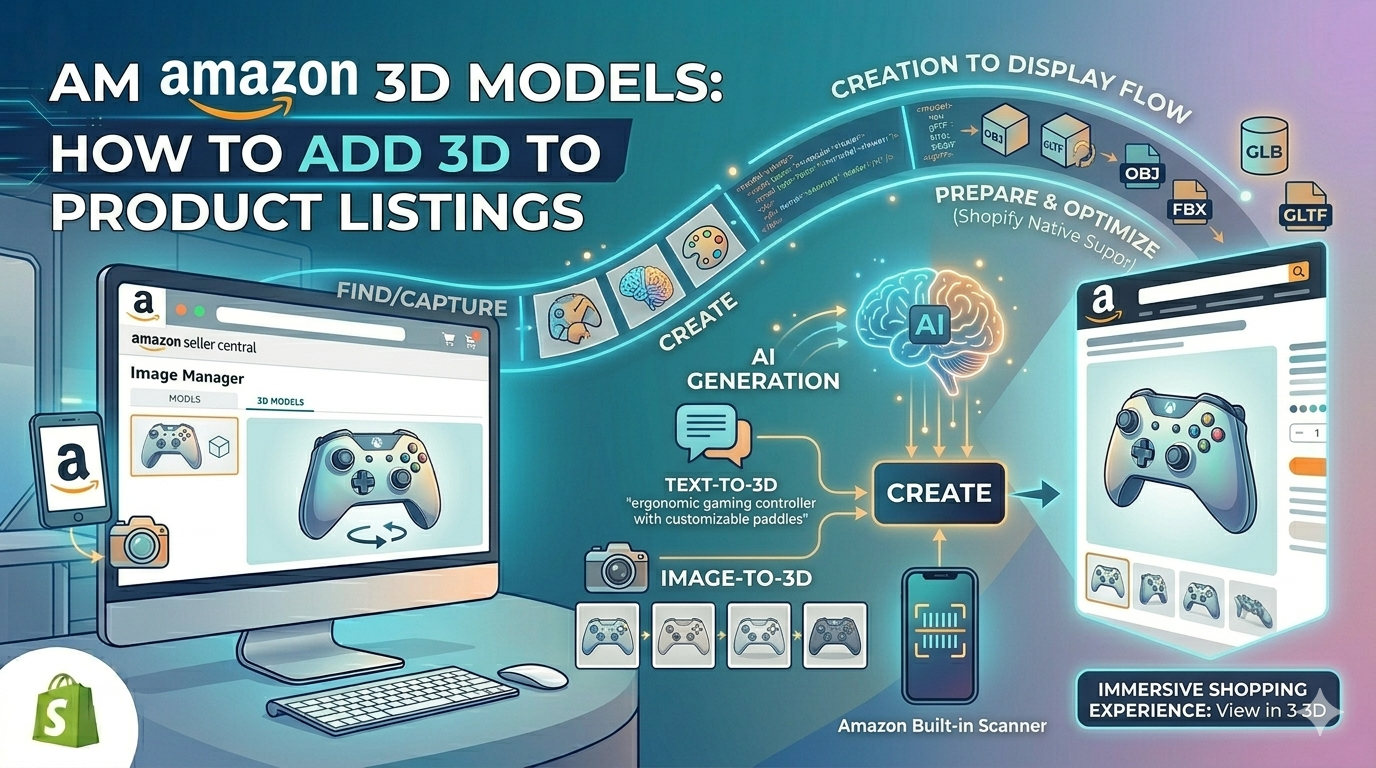
Amazon 3D Models: How to Add 3D to Product Listings
In the competitive world of e-commerce, creating an engaging shopping experience is no longer a luxury??t's a necessity. Top online platforms are constantly evolving, and one of the most significant recent shifts has been the adoption of 3D models and augmented reality (AR). Amazon, a leader in the space, has fully embraced this technology, offering sellers powerful tools to showcase their products in 3D. For sellers, this presents a massive opportunity to stand out, increase customer confidence, and drive sales. This article is a practical guide on how to create an Amazon 3D product listing, exploring everything from creation to implementation.
What is an Amazon 3D Product Listing and Why Should You Care?
Amazon 3D models are digital, three-dimensional representations of your products that customers can interact with directly on the product page. Instead of just static images, shoppers can rotate, zoom, and inspect a product from every angle. This technology powers several distinct experiences on the platform:
- View in 3D: This is the most common feature, allowing users on both mobile and desktop to spin a product 360 degrees. It provides a much clearer sense of a product's shape, size, and details than a simple photo gallery.
- View in Your Room: For larger items like furniture and home decor, this AR feature lets customers use their smartphone camera to place a virtual version of the product in their own space. It helps answer critical questions about fit and style, bridging the gap between online and in-store shopping.
- Virtual Try-On: A big deal for apparel and accessories, this allows shoppers to see how products like shoes or sunglasses will look on them. It uses the device's camera to overlay the 3D model onto the user in real-time.
The impact of these features is not just about novelty; a good Amazon 3D product listing translates to tangible business results. According to Amazon's own data, products with 3D and AR features have seen a significant uplift in conversion rates and a notable decrease in returns, as customers can make more informed purchasing decisions.
How to Get 3D Models for Your Amazon 3D Product Listing
To enable these immersive experiences, you first need a 3D model of your product. Fortunately, there are several paths you can take, each with its own set of advantages and disadvantages. The right choice depends on your budget, technical skill, and quality requirements.
Method 1: Amazon's Built-in 3D Scanner
For sellers who are brand-registered, Amazon offers a built-in 3D scanning tool directly within the Amazon Seller app (currently available on iOS devices). The process involves using your phone's camera to capture a series of images of your product from various angles. Amazon's software then stitches these images together to create a 3D model.
This method is incredibly accessible and comes at no extra cost, making it a great entry point for sellers new to 3D. However, the quality of the resulting model can be basic and may lack the fine detail of a professionally created asset. Also, you don't own the model; it can only be used on the Amazon platform.
Method 2: Hiring a Professional 3D Agency
If you require high-fidelity models and have the budget, hiring a professional 3D modeling agency is a reliable option. These agencies have the expertise and software to create photorealistic models that accurately represent your products. They can work from product photos or physical samples to deliver an Amazon-ready file.
This approach guarantees a high-quality result but is also the most expensive. It's a worthy investment for sellers with complex products or those who want to ensure their brand is presented in the best possible light.
Method 3: Creating Your Own with an AI 3D Model Generator
A modern and increasingly popular approach is to use an AI product visualization platform. These tools have made 3D creation more accessible than ever. With a platform like Hyper3D, you can use an AI 3D model generator to turn standard product photos into fully-realized 3D assets. The process is often as simple as uploading an image and letting the AI handle the complex modeling tasks.
Tools like Rodin can generate a model in minutes, and companion tools like OmniCraft, a 3D format converter, ensure your file is in the correct format for Amazon (typically GLB or GLTF). This method offers a balance of quality, cost, and control, making it a powerful option for many sellers. You can even use a dedicated product design 3D tool for more custom designs.
Step-by-Step: Uploading Your 3D Model to Amazon
Once you have your 3D model file, the process of adding it to your product listing is straightforward. Here?? how you do it through Amazon Seller Central:
1. Navigate to the Image Manager: From the main menu, go to 'Catalog' and then select 'Upload Images'.
2. Find Your Product: In the Image Manager, search for the product (by ASIN, SKU, or name) that you want to enhance with a 3D model.
3. Access the 3D Models Tab: On the product's image management page, you will see a series of tabs. Click on the one labeled '3D Models'.
4. Upload Your File: Click the 'Upload 3D Model' button and select the GLB or GLTF file from your computer. Amazon's system will then process the file.
After uploading, the model will go through a review process. Once approved, it will appear on your product detail page, enabling the 'View in 3D' and other related experiences for your customers.
My First-Hand Experience: From a Photo to an Amazon-Ready 3D Model
To understand the process better, I decided to create a 3D model for a common e-commerce product: a simple ceramic bowl. I wanted to see how quickly I could get from a basic photo to an asset ready for an Amazon 3D product listing.
First, I took a few clear, well-lit photos of the bowl from different angles using just my smartphone. I then turned to Hyper3D's image to 3D tool. I uploaded the best front-facing shot and let the AI get to work. Within about five minutes, the Rodin AI 3D model generator had produced a complete 3D model. I was impressed with the texture detail; it captured the subtle glaze of the ceramic quite well.
The initial model was exported as an OBJ file. Since Amazon's preferred format is GLB, I used the OmniCraft 3D format converter to make the switch. This was a simple, two-click process. The final GLB file was lightweight and optimized for the web, perfect for uploading to Amazon. The entire workflow, from taking the photo to having a final file ready for an Amazon 3D product listing, took less than 15 minutes.
Which 3D Creation Method is Right for You? An Objective Comparison
Choosing the right method to create your 3D assets is a key decision. Below is a table that breaks down the different approaches to help you decide.
| Feature | Amazon 3D Scanner | Professional Agency | AI Generator (Hyper3D) |
|---|---|---|---|
| Cost | Free | High ($$$) | Low to Medium ($-$$) |
| Quality | Basic to Moderate | Very High | High |
| Speed | Fast (minutes to scan) | Slow (days to weeks) | Very Fast (minutes) |
| Ownership | Amazon owns the model | You own the model | You own the model |
| Best For | Sellers on a tight budget or just starting with 3D. | Brands with high-value products needing photorealistic detail. | Sellers who want a balance of quality, speed, and cost-effectiveness. |
Frequently Asked Questions (FAQ)
What is the best 3D file format for an Amazon 3D product listing?
Amazon accepts both GLB and GLTF file formats. GLB is generally preferred as it is a binary file that packages everything (the model, textures, and animations) into a single file, making it easier to manage.
How much does it cost to add 3D models to Amazon listings?
The cost varies greatly depending on the creation method. Using Amazon's own scanner is free. Hiring an agency can cost several hundred to thousands of dollars per model. Using an AI generator is often a subscription-based service, providing a more scalable cost structure.
Can I use the same 3D model on my own website?
If you hire an agency or use a platform like Hyper3D to create your model, you own the asset and can use it anywhere you like, including your own e-commerce site, social media, and marketing campaigns. If you use Amazon's scanner, the model is restricted to their platform.
How long does it take for a 3D model to appear on my Amazon listing?
After you upload your model, it goes through an approval process which can take anywhere from a few hours to a couple of days. Once approved, it should appear on your listing shortly after.
What products are not eligible for 3D models on Amazon?
While the list of eligible categories is constantly expanding, some products with complex geometries, transparent or reflective surfaces, or items with fine details like fur or hair may not be suitable for the current technology. It's always best to check Amazon's latest guidelines.
Conclusion
Adding 3D models to your Amazon product listings is a powerful way to enhance the customer experience, build trust, and ultimately increase sales. With multiple creation methods available, from free built-in tools to advanced AI platforms, this technology is more accessible than ever. By investing in 3D content, you are not just adding a flashy feature to your page; you are providing genuine value to your customers and future-proofing your e-commerce business.