

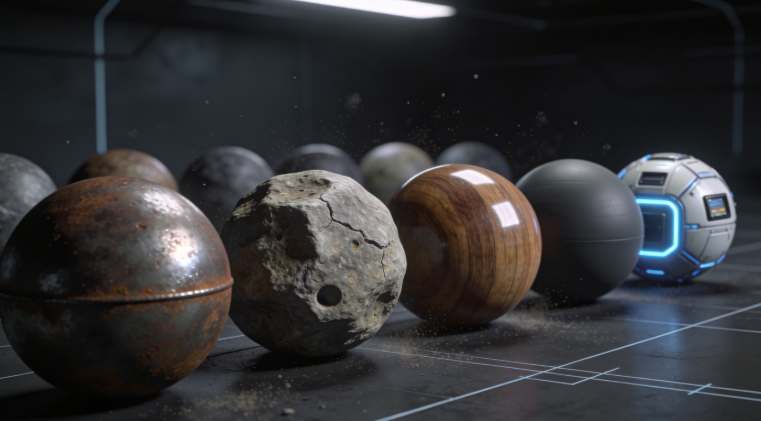
Free AI Texture Generator: Top No-Cost Tools
Creating realistic and detailed textures is a fundamental part of 3D modeling, but it can also be one of the most time-consuming. For artists, game developers, and designers, finding the right PBR (Physically Based Rendering) materials is a constant hunt. Traditionally, this meant either creating textures by hand or searching through online libraries. Today, a new class of tools has emerged: the free AI texture generator, a solution for many 3D artists. These platforms use artificial intelligence to create unique, high-quality textures from simple text prompts or source images, often in just a few seconds.
Unlike static texture libraries, AI generators offer incredible flexibility. You can describe exactly what you need??rom sci-fi metal paneling to glowing fantasy moss??nd get a custom-made texture map. This article explores the best no-cost options, comparing top platforms like Hyper3D and Meshy alongside massive libraries like PolyHaven and AmbientCG to give you a clear picture of the current landscape.
What is an AI Texture Generator and How Does It Work? with Free Ai Texture Generator
A free AI texture generator is a tool that uses machine learning models to synthesize digital materials for 3D objects. Instead of manually painting or photographing a surface, you can instruct an AI to create it for you. This process typically starts with a text prompt (e.g., "old cracked brick wall with moss") or a reference image. The AI then produces a set of PBR texture maps, which are images that tell a 3D rendering engine how light should interact with a surface to simulate its material properties.
How AI Texture Generators Work
The technology behind these tools is rooted in diffusion models, the same type of AI that powers popular AI art generators. These models are trained on vast datasets of images and their corresponding text descriptions. When you provide a prompt, the model starts with a field of digital noise and gradually refines it over a series of steps until it matches your description. For a free AI texture generator, the process is optimized to create images that are "tileable" or "seamless," meaning they can be repeated across a surface without visible seams.
What are PBR Textures?
PBR stands for Physically Based Rendering, a method that models real-world light flow. A PBR material uses several texture maps to describe physical properties, such as Albedo (color), Normal (detail), Roughness, and Metallic.
A good free AI texture generator will produce most, if not all, of these maps for you, ensuring your 3D models look realistic under any lighting condition.
Top Free AI Texture Generators Compared
Choosing the right tool depends heavily on your specific needs. Some are great for rapid prototyping, while others offer deep control and high-fidelity results. Here?? a breakdown of the top free AI texture generator options.
| Tool | Best For | Top Strength | Key Limitation |
|---|---|---|---|
| Hyper3D | All-in-one workflow | Integrated with a full 3D modeling suite | Texture generation happens on an existing model |
| Meshy AI | High-quality texturing | Excellent texture quality and polished UI | Free credits are limited |
| PolyHaven | High-quality PBR assets | Massive library of human-made, free assets | Not an AI generator; it's a static library |
| AmbientCG | Procedural and scanned textures | Large collection of free, high-quality textures | Also a library, not an on-demand generator |
| Tripo AI | Game developers | Fast generation and auto-rigging features | Texture quality can be less consistent |
Hyper3D (Rodin)
Hyper3D is a full AI 3D model generator with a powerful AI texture generator in its OmniCraft suite, designed to work directly on models within the ecosystem.
- Pros: The all-in-one workflow is a massive advantage. You can go from a text prompt to a fully textured 3D model without ever leaving your browser. The integration means you can immediately see your texture applied to your model and make adjustments. The free tier is generous enough for experimentation.
- Cons: It's not a standalone texture generator. You need a 3D model to apply the texture to, so it's less suited for creating a library of textures to use later. The focus is on texturing an asset as part of a larger creation process.
- Best for: Artists and designers who want a single, integrated platform for creating and texturing 3D assets from start to finish.
Meshy AI
Meshy is a popular competitor with a polished UI and high-quality texturing. It offers a free trial with credits for generating textures and models.
- Pros: Meshy often produces some of the best-looking textures, with a great understanding of material properties from text prompts. The web interface is clean and easy to navigate.
- Cons: The free credits can be used up quickly, especially when experimenting. While the texture quality is high, some users have noted that the underlying geometry of its generated models can sometimes be less clean than alternatives.
- Best for: Users who prioritize top-tier texture quality and a smooth user experience, and are willing to work within a credit-based system.
PolyHaven
PolyHaven is not an AI generator but an essential resource for free, high-quality PBR textures, models, and HDRIs under a CC0 license.
- Pros: The quality is exceptional. Every texture is professionally made and comes with a full set of PBR maps. It's completely free, with no quotas or limitations. The CC0 license means you can use the assets for any purpose, commercial or personal, without attribution.
- Cons: It's a static library. You can't generate custom textures on demand. You are limited to what is available, although the library is vast and constantly growing.
- Best for: Anyone who needs production-ready, high-quality PBR textures for free and doesn't require a custom-generated asset.
AmbientCG
Similar to PolyHaven, AmbientCG offers a massive collection of free, CC0-licensed PBR materials made with procedural and scanning methods.
- Pros: An enormous library with a wide variety of materials, from realistic wood and metal to more abstract patterns. The quality is consistently high, and the CC0 license provides maximum flexibility.
- Cons: Like PolyHaven, it's a library, not a generator. You can't create textures from a text prompt. The sheer number of options can sometimes be overwhelming.
- Best for: Developers and artists who need a large, diverse, and completely free source of PBR materials for their projects.
Tripo AI
Tripo AI is a fast text-to-3D model generator with texturing capabilities and features for game developers.
- Pros: It's very fast, delivering textured models in a short amount of time. The platform offers a generous amount of free credits, making it highly accessible. It also has features like auto-rigging, which is a huge plus for animators and game developers.
- Cons: The texture quality can be less consistent compared to more specialized tools like Meshy. Some users have reported issues with certain file exports, like STL files having incorrect normals.
- Best for: Game developers and creators who need to prototype 3D assets quickly and can benefit from its game-centric features.
My First-Hand Experience with Hyper3D's AI Texture Generator
To test the process, I used the Hyper3D AI texture generator. In the dark-themed Rodin interface, I generated a shield model and then used the OmniCraft sidebar to access the texture tool. My prompt, "Ornate gold shield with intricate blue glowing runes," produced an impressive result in about 30 seconds. The gold was metallic, the runes glowed, and the normal map added depth. A second prompt, "Old, weathered stone with moss growing in the cracks," yielded a realistic texture with a convincing roughness map. The entire workflow was smooth, and I could export the textured model directly as a GLB or FBX.
Step-by-Step Guide to Creating Textures with AI
The general workflow for using a free AI texture generator is straightforward:
1. Choose Your Platform: Pick a tool like Hyper3D for integrated modeling or Meshy for standalone texture generation.
2. Write a Detailed Prompt: Be specific to get the best results (e.g., "old red brick wall with cracked bricks and peeling paint").
3. Generate and Refine: Run the generator and refine your prompt as needed.
4. Apply and Preview: Apply the texture to your model, either automatically in an integrated tool or manually in software like Blender.
5. Export Your Asset: Export the final model or texture maps. Hyper3D supports image to 3D conversion and all major formats.
Common Use Cases for AI-Generated Textures
Textures from a free AI texture generator have wide applications, including:
- Game Development: Creating unique textures for props and environments.
- Architecture: Visualizing materials and finishes.
- Prototyping: Testing different looks and styles.
- VFX and Animation: Generating custom surfaces for digital assets.
- Hobbyist 3D Art: Experimenting with creative ideas.
Frequently Asked Questions (FAQ)
What is the best free AI for textures?
It depends on your goal. For an all-in-one solution where you generate a model and texture it immediately, Hyper3D is arguably the best. If you only need to generate a texture from a prompt and prioritize quality, Meshy's free tier is excellent. For the highest quality, human-made textures without AI generation, PolyHaven and AmbientCG are the top choices.
Can I use AI-generated textures in commercial projects?
This depends on the terms of service of the specific platform you use. Assets from libraries like PolyHaven and AmbientCG use CC0 licenses, which explicitly allow commercial use. For AI generators like Hyper3D, Meshy, and Tripo, you must check their specific licensing agreements. Most platforms have tiers that allow commercial use, but the free tiers may have restrictions.
Do I need a powerful computer to use an AI texture generator?
No. Almost all of the popular AI texture generators are cloud-based web applications. This means the actual processing happens on their powerful servers, not on your local machine. As long as you have a stable internet connection and a modern web browser, you can use these tools from almost any computer.
How do I make AI textures seamless?
Most AI texture generators designed for 3D applications are specifically trained to produce seamless, tileable textures by default. When writing your prompt, you can add terms like "seamless," "tileable," or "repeating pattern" to encourage the AI to create a texture that won't show seams when tiled across a large surface. If a texture isn't perfectly seamless, you can use tools like Adobe Photoshop's "Offset" filter or specialized software to fix it.
What's the difference between a texture generator and a material generator?
The terms are often used interchangeably, but there can be a subtle difference. A texture generator typically focuses on creating the image maps (albedo, normal, roughness, etc.). A material generator might imply a more complete solution that not only creates the textures but also sets up the material shader for a specific rendering engine. However, in the context of modern AI tools, most "texture generators" are effectively creating full PBR materials. You can find a great GLTF Viewer to inspect these materials.