

'''
# Low Poly 3D Models: Style Guide & AI Generation
The world of 3D modeling is vast and ever-evolving, with styles ranging from hyper-realistic to completely abstract. One style that has stood the test of time and continues to be popular is the low poly 3D model. You've likely seen this aesthetic in video games, animations, and even architectural visualizations. But what exactly is it, and why is it so appealing?
This guide will walk you through the essentials of the low poly style, how to create your own low poly models, and how AI-powered tools like a low poly 3D generator are making this art form more accessible than ever for creating stunning low poly 3d models. We'll also explore how you can take an existing image and convert it into a 3D model using an image to 3D tool.
Low Poly 3D Models: The Low Poly Aesthetic: A Style Guide
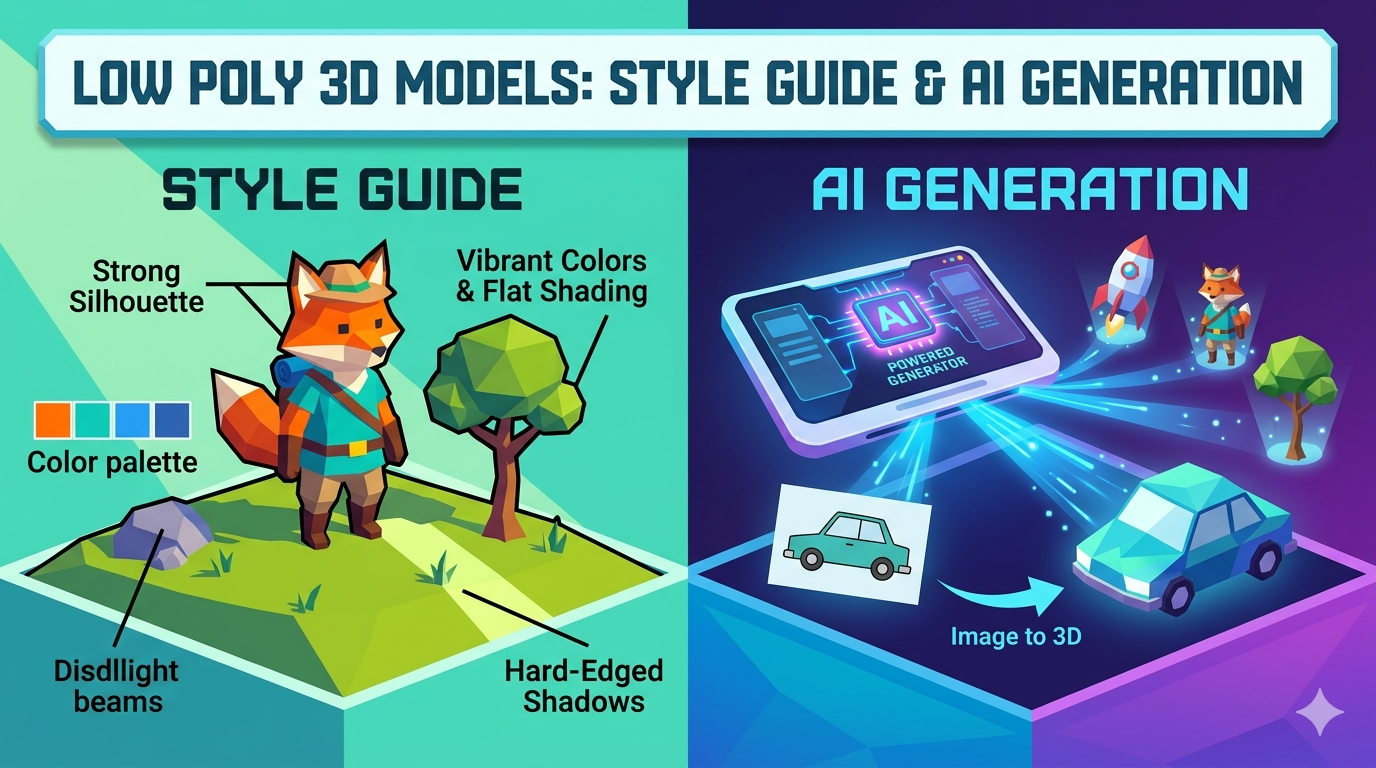
Low poly is more than just a technical limitation; it's a distinct artistic style. It's characterized by a small number of polygons, which results in a faceted, geometric appearance. This simplicity is a large part of its charm, but there's more to it than just a low polygon count when it comes to creating impressive low poly 3d models.
Key Characteristics of the Low Poly Style
The most defining feature of low poly art is its use of a limited number of polygons. This creates a blocky, angular look that is immediately recognizable. However, a good low poly model isn't just a simplified version of a high poly one. It's a carefully crafted piece of art that uses its limitations to its advantage.
The Importance of Clean Silhouettes and Shape Language
With fewer polygons to work with, the overall shape and silhouette of a model become incredibly important. A strong, recognizable silhouette is key to creating a successful low poly model. This is where shape language comes in. By using basic shapes and forms, artists can create models that are easy to read and understand, even from a distance.
Color Palettes and Texturing Techniques
Color plays a huge role in the low poly aesthetic. Bold, vibrant color palettes are often used to create a striking visual impact. Flat shading is a common technique, where each polygon is a single, solid color. This emphasizes the geometric nature of the model and creates a clean, stylized look. Gradients and subtle textures can also be used to add depth and visual interest.
Lighting and Shadows in Low Poly Art
Lighting is crucial for bringing a low poly scene to life. Simple lighting setups are often the most effective, as they complement the minimalist style. Hard-edged shadows can be used to accentuate the geometric forms and create a sense of depth and volume.
Creating Low Poly 3D Models: A Step-by-Step Guide
Creating your own low poly 3D models can be a rewarding experience. Here's a general workflow to get you started on your journey to making your own low poly 3d models:
1. Conceptualization and Reference Gathering: Before you start modeling, it's important to have a clear idea of what you want to create. Gather reference images and create a mood board to help you define the style and direction of your model.
2. Blocking Out Base Shapes: Start by creating the basic shapes of your model using simple geometric primitives like cubes, spheres, and cylinders. This will help you establish the overall form and proportions of your model.
3. Texturing and Shading: Once you're happy with the basic shape of your model, you can start adding color and texture. As mentioned earlier, flat shading is a popular choice for low poly models, but you can also experiment with gradients and simple textures.
4. Optimization for Real-Time Rendering: If you're creating a model for a game or other real-time application, you'll need to optimize it for performance. This involves reducing the polygon count as much as possible without sacrificing the overall look of the model.
My First-Hand Experience with Low Poly 3D Model Generators
As a 3D artist, I've spent countless hours creating models from scratch. So, I was curious to see how AI-powered low poly generators would stack up. I decided to try out a few different tools, including Hyper3D's Rodin and OmniCraft tools.
My first impression was that these tools are incredibly fast. I was able to generate a variety of low poly models in a matter of minutes, a process that would have taken me hours to do manually. The quality of the models was surprisingly good, with clean topology and well-defined shapes.
I found that the key to getting good results is to start with a clear and simple prompt. The more specific you are with your prompt, the better the AI will be able to understand what you're looking for. I also found that it's helpful to experiment with the different generation modes. For example, the "Focal" mode in Rodin is great for creating detailed models, while the "Zero" mode is perfect for creating more abstract and stylized models.
Objective Comparison of Low Poly 3D Model Generators
While Hyper3D's tools are impressive, there are other low poly generators on the market. Here's a quick comparison of some of the most popular options:
| Tool | Pros | Cons |
|---|---|---|
| Hyper3D | Fast and easy to use, high-quality results, multiple generation modes, good for both beginners and professionals. | Can be a bit overwhelming at first due to the number of options. |
| Blender | Free and open-source, powerful and versatile, large and active community. | Steep learning curve, not as intuitive as some other tools. |
| SelfCAD | User-friendly interface, good for beginners, affordable. | Not as powerful as some other tools, limited features. |
Ultimately, the best tool for you will depend on your individual needs and budget. If you're looking for a fast and easy way to create high-quality low poly models, then Hyper3D is a great option. If you're on a budget and don't mind a steeper learning curve, then Blender is a fantastic choice. And if you're a beginner who's just starting out, then SelfCAD is a good place to start.
Frequently Asked Questions (FAQ)
What is the difference between low poly and high poly models?
The main difference between low poly and high poly models is the number of polygons they contain. Low poly models have a small number of polygons, which gives them a blocky, geometric appearance. High poly models, on the other hand, have a large number of polygons, which allows for more detail and smoother surfaces.
Is low poly art only for games?
No, low poly art is not just for games. It's also used in animations, architectural visualizations, and even product design. The minimalist aesthetic of low poly art makes it a versatile style that can be used in a variety of applications.
Can I 3D print low poly models?
Yes, you can 3D print low poly models. In fact, the simple geometry of low poly models makes them ideal for 3D printing. You can export your models in a variety of formats, including STL, OBJ, and FBX, which are all compatible with most 3D printers.
What is the best software for creating low poly models?
There is no single "best" software for creating low poly models. The best software for you will depend on your individual needs and budget. Some popular options include Hyper3D, Blender, and SelfCAD.
How do I get started with low poly modeling?
The best way to get started with low poly modeling is to simply start experimenting. There are plenty of tutorials and resources available online to help you learn the basics. And with the rise of AI-powered tools, it's never been easier to create your own low poly 3D models.
Conclusion
Low poly 3D modeling is a timeless art form that continues to be popular for its simplicity, versatility, and aesthetic appeal, and it's a great way to create your own low poly 3d models. Whether you're a seasoned 3D artist or a complete beginner, there are plenty of tools and resources available to help you create your own stunning low poly models. And with the advent of AI-powered generators, the future of low poly modeling is looking brighter than ever.
'''
You can also try the text to 3D model for quick results.