

How to Make 3D Models with AI: Step-by-Step
Creating 3D models used to be a complex and time-consuming process, requiring specialized software and years of training. Today, artificial intelligence is changing the game, allowing anyone to generate 3D assets from simple text prompts or 2D images. This has opened up new possibilities for game developers, artists, and designers, making 3D content creation more accessible than ever before.
Whether you're a seasoned 3D artist looking to speed up your workflow or a complete beginner curious about 3D modeling, AI-powered tools can help you bring your ideas to life. Platforms like Hyper3D, Meshy, and Tripo offer different approaches to AI 3D generation, each with its own strengths. In this guide, we'll explore how to make 3d models with ai, compare their features,, compare their features, and walk you through the process of creating your first AI-generated 3D model.
How to Make 3D Models with AI: How it Works
AI 3D model generation is about teaching a machine to understand and construct three-dimensional shapes from two-dimensional information, like images or text descriptions. This process relies on complex algorithms and neural networks that have been trained on vast datasets of 3D objects. Let's look at some of the key technologies that make this possible.
Neural Radiance Fields (NeRF)
Neural Radiance Fields, or NeRF, is a technique that uses a neural network to create a 3D representation of a scene from a set of 2D images. It works by predicting the color and density of light at any point in space, effectively creating a continuous volumetric field. This allows for the generation of highly detailed and realistic 3D scenes with complex lighting and reflections.
Large Reconstruction Models (LRMs)
Large Reconstruction Models (LRMs) are a more recent development that builds on the principles of NeRF. LRMs are trained on massive datasets of 3D models and can generate high-quality, textured meshes from a single image. They are particularly good at creating models with clean topology, which is essential for animation and game development.
Diffusion Models
Diffusion models are a class of generative models that have shown incredible success in image and text generation. In the context of 3D, they work by starting with a random cloud of points and gradually refining it into a coherent 3D shape based on a text prompt or image input. This process allows for a high degree of creative control and can produce a wide variety of 3D styles.
Top AI 3D Model Generators Compared
When you're learning how to make 3d models with ai, choosing the right tool depends on your specific needs, from the desired output quality to your technical skill level. Here?? a look at some of the most popular platforms available today.
| Tool | Best For | Top Strength | Key Limitation |
|---|---|---|---|
| Meshy AI | Texturing & UX | Best textures | Rougher geometry |
| Tripo AI | Game dev pipelines | Auto-rigging | STL export issues |
| Hyper3D | Topology & ecosystem | Cleanest geometry | Less versatile for stylized |
| Hunyuan3D | Free/budget | 20 free/day | Chinese interface |
| Luma AI | Rapid prototyping | Speed | Triangle soup topology |
Meshy AI
Meshy is widely praised for its exceptional texturing capabilities and polished user interface. If your priority is creating models with beautiful, high-quality materials right out of the box, Meshy is a strong contender.
- Pros: Best-in-class texturing engine, intuitive and polished user experience, great library of styles like voxel and low-poly.
- Cons: The underlying geometry of the models can be less refined or "rough" on more complex objects.
- Best for: Artists and designers who prioritize final texture quality and a smooth workflow.
Tripo AI
Tripo AI is a favorite among game developers, largely due to its speed and features tailored for game development pipelines. It offers a generous free tier and includes unique features like auto-rigging.
- Pros: Very fast generation, built-in auto-rigging and segmentation tools, generous free credit system.
- Cons: Users have reported that STL exports can sometimes have issues with normals, and it's less specialized for creating realistic avatars.
- Best for: Game developers who need to create pipeline-ready assets quickly.
Hyper3D (Rodin)
Hyper3D's Rodin engine is known for producing models with exceptionally clean and sharp topology, making it a top choice for character models and avatars. Its all-in-one ecosystem allows you to go from generation to texturing and editing within the browser.
- Pros: Produces the cleanest geometry, especially for characters; features the integrated OmniCraft tool suite for a full workflow; supports multi-view inputs.
- Cons: It is more specialized for character and organic models, and can feel less versatile for creating stylized, non-photorealistic props.
- Best for: Users who need high-quality topology for characters and avatars, and prefer an all-in-one AI 3D model generator.
My First-Hand Experience with Hyper3D
To see how these tools perform in a real-world scenario, I took Hyper3D's Rodin generator for a spin. My goal was to create a 3D model from a simple text prompt. The interface is clean, with a dark-themed workspace that?? easy on the eyes. The main tools are organized in the OmniCraft sidebar on the left, with the generation settings and a prominent "GENERATE" button on the right.
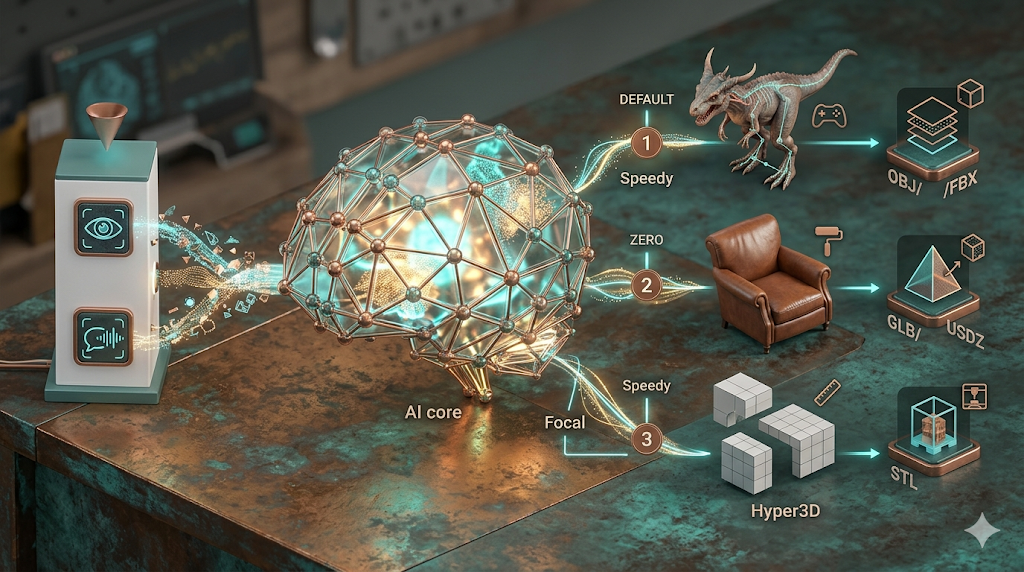
I started with the prompt "a detailed, high-quality 3d model of a classic leather armchair." I decided to test two different generation modes: Speedy and Focal. I tested the Speedy and Focal modes, but Hyper3D also offers Default and Zero modes for different quality and speed trade-offs. The Speedy generation was impressively fast, producing a decent model in under a minute. The shape was correct, but the texture details were a bit blurry. The Focal mode took a bit longer, around three minutes, but the result was significantly better. The leather texture had realistic wrinkles and a subtle sheen, and the overall geometry was much sharper.
After generation, I used the built-in GLTF Viewer to inspect the model. The topology was very clean, with well-organized polygons that would be easy to work with in a tool like Blender. I then exported the model as a GLB file, which is a great format for web-based applications and AR. The entire process, from prompt to export, was smooth and intuitive, all happening within a single browser tab.
How to Make 3D Models with AI: A Step-by-Step Workflow
Creating a 3D model with AI is a straightforward process. Here?? a general workflow that applies to most platforms:
1. Choose Your Input Method: Decide whether you want to generate a model from a text prompt or a 2D image. For text, be as descriptive as possible. For images, use a clear, high-resolution picture of the object.
2. Select a Generation Mode: Most platforms offer different modes that balance speed and quality. For quick previews, a speedy or draft mode is fine. For final assets, choose a high-quality or refined mode.
3. Generate the Model: Input your prompt or image and start the generation. This can take anywhere from a few seconds to several minutes, depending on the complexity of the model and the platform you're using.
4. Refine and Texture: Once the initial model is generated, you can often refine it. Many platforms, like Hyper3D with its AI Texture Generator, allow you to apply different materials and textures to your model directly in the browser.
5. Export the Model: Finally, export your model in the desired format. Common formats include OBJ, FBX, GLB, and STL. The best format depends on your intended use case. For example, use an Image-to-STL converter for 3D printing.
Common Use Cases and Applications
AI-generated 3D models are being used in a wide range of industries:
- Game Development: Quickly create props, characters, and environments for games.
- Product Design: Rapidly prototype new product ideas and create visualizations for marketing.
- Architecture: Generate 3D models of buildings and interiors for architectural visualization.
- E-commerce: Create 3D models of products for interactive online shopping experiences.
- 3D Printing: Easily create custom models for 3D printing, from figurines to functional parts.
FAQ
What is the best AI for text-to-3D?
There is no single "best" tool, as it depends on your needs. For generating high-quality characters with clean topology, Hyper3D's text-to-3D model generator is a top choice. If you need to create game assets quickly and value features like auto-rigging, Tripo AI is an excellent option. For those who prioritize the final texture and material quality, Meshy AI often delivers the most polished results.
Can I turn a 2D image into a 3D model?
Yes, absolutely. Most AI 3D generation platforms, including Hyper3D, Meshy, and Tripo, offer an image to 3D model feature. You simply upload a 2D image, and the AI will generate a corresponding 3D model. The quality of the result often depends on the clarity and angle of the source image.
Are AI-generated 3D models ready for production?
It depends on the tool and the use case. Models from platforms like Hyper3D are often clean enough for direct use in game engines or animation software. However, models from other tools, like Luma AI's Genie, might produce "triangle soup" topology that requires manual cleanup in a 3D modeling program like Blender before they are production-ready.
What file formats do AI 3D generators support?
Most AI 3D generators support a range of standard 3D file formats. The most common are OBJ, FBX, GLB, and STL. Hyper3D, for example, supports all of these, plus USDZ for AR applications. Always check the export options of a tool to ensure it supports the format you need for your specific workflow.
How much does it cost to make a 3D model with AI?
Costs vary widely. Some platforms like Tripo AI and Tencent Hunyuan3D offer generous free tiers, allowing you to generate a certain number of models per day or month at no cost. Other platforms operate on a credit system, where you purchase credits to spend on generations. The cost per model often depends on the selected quality and complexity.