

What Is 3D Modeling? A Complete Introduction
Three-dimensional (3D) modeling is the process of creating a mathematical representation of any three-dimensional object or surface. It's a bit like digital sculpting, where artists and designers use specialized software to build objects that have height, width, and depth. You can see the results of 3D modeling everywhere, from the animated characters in your favorite movies to the virtual reality games you play, and even in the design of the phone in your hand. While professional tools like Blender and Maya have been the industry standard for years, a new wave of AI-powered platforms is making 3D creation more accessible than ever before.
What Is 3D Modeling: The Fundamentals of 3D Modeling
To really understand what is 3D modeling, it helps to know what these digital objects are made of and the general workflow for creating them. So, what is 3D modeling? Let's break it down.
What are the basic components of a 3D model?
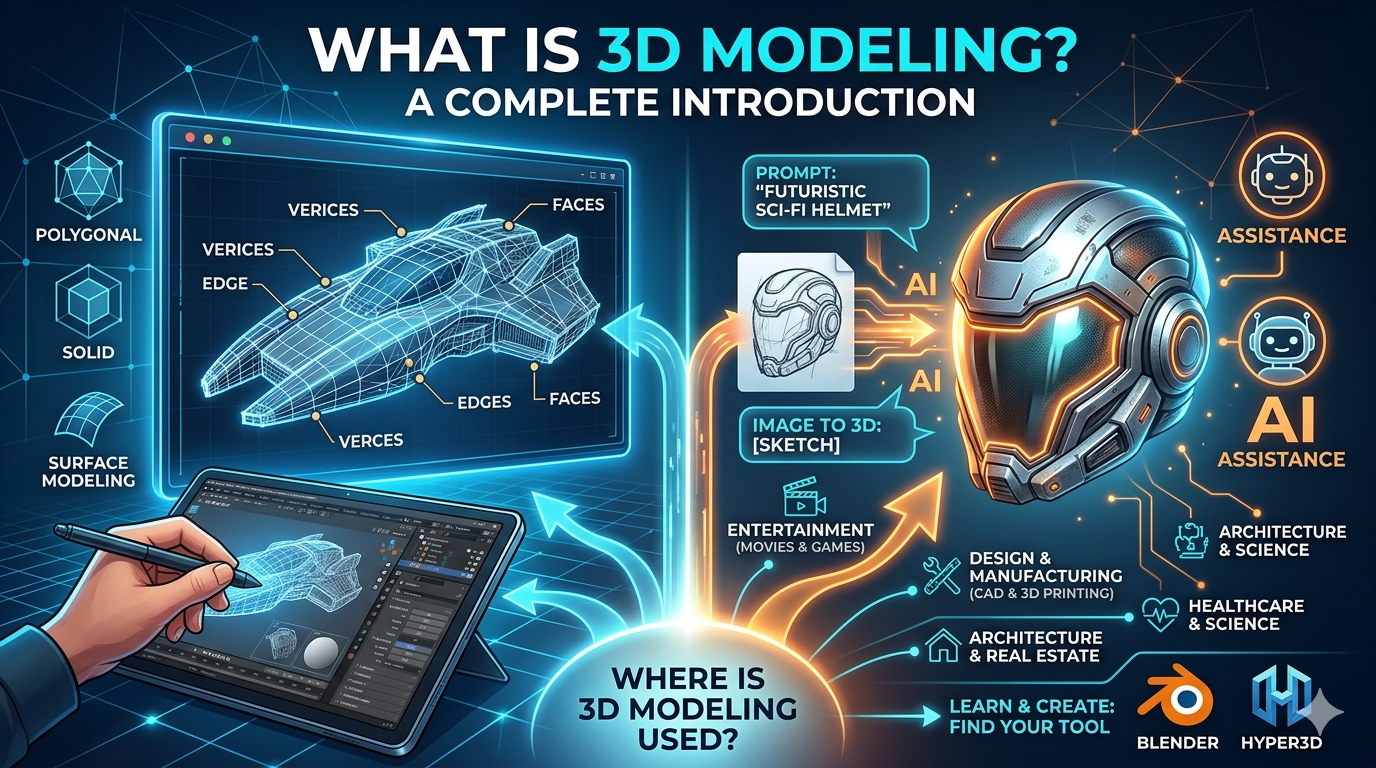
Fundamentally, a 3D model is a collection of points in 3D space called vertices. These vertices are connected by lines called edges. When you connect three or more edges, you form a polygon, or a face. Think of it like a digital connect-the-dots puzzle. You place the dots (vertices), draw lines between them (edges), and fill in the shapes to create a surface (faces). Together, these vertices, edges, and faces form a mesh that makes up the shape of the 3D object.
How does the 3D modeling process work?
While the specifics can vary depending on the project and the software used, the 3D modeling process generally follows four main stages:
1. Conceptualization: This is the initial planning phase where the artist or designer gathers reference materials and sketches out the initial idea. It's all about defining the look and feel of the final model.
2. Modeling: This is where the actual creation happens. Using specialized software, the artist builds the 3D mesh, manipulating vertices, edges, and faces to shape the object.
3. Texturing: Once the model is built, it's time to add color and surface details. This is done by applying 2D images, called textures, to the 3D model's surface. This is what gives a model its realistic or stylized appearance, from the roughness of a brick wall to the shininess of a metal robot.
4. Rendering: The final step is to create a 2D image or animation from the 3D scene. The rendering engine calculates the lighting, shadows, and reflections to produce a high-quality final image.
Common 3D Modeling Techniques
There are several different techniques for creating 3D models, each with its own strengths and best-use cases. Understanding these techniques is key to understanding what is 3D modeling.
Polygonal Modeling
This is the most common type of 3D modeling and is used extensively in game development, film, and animation. It involves creating a mesh of polygons and then manipulating them to form the desired shape. It's a versatile technique that can be used to create everything from simple objects to highly detailed characters.
Solid Modeling
Solid modeling is often used in computer-aided design (CAD) for engineering and product design. Unlike polygonal modeling, which creates a hollow shell, solid modeling creates a solid, watertight object. This makes it ideal for designing objects that need to be manufactured or 3D printed, as it provides a more accurate representation of the object's volume and mass.
Surface Modeling
Surface modeling is similar to polygonal modeling, but it focuses on creating smooth, flowing surfaces. It's often used in industrial design for creating products with complex curves, like cars and consumer electronics. This technique gives designers a high degree of control over the shape and curvature of the model's surface.
Procedural Modeling
Procedural modeling uses algorithms to generate 3D models. Instead of manually creating every detail, the artist defines a set of rules and parameters, and the software generates the model automatically. This is a powerful technique for creating complex objects like landscapes, cities, and natural environments, as it can generate a high level of detail with relatively little manual effort.
Where is 3D Modeling Used?
The applications of 3D modeling are vast and continue to expand as the technology evolves. So, where is 3D modeling used? You might be surprised by the answer.
Entertainment (Games, Film, and Animation)
This is perhaps the most well-known application of 3D modeling. From the fantastical creatures in blockbuster films to the immersive worlds of video games, 3D modeling is the backbone of modern digital entertainment. It allows artists to create characters, environments, and special effects that would be impossible to create with practical effects alone.
Design and Manufacturing
In the world of product design, 3D modeling is an essential tool for everything from initial concept design to final manufacturing. It allows designers to create and iterate on virtual prototypes, saving time and money compared to traditional prototyping methods. With the rise of 3D printing, it's now possible to go directly from a digital model to a physical object.
Architecture and Real Estate
Architects use 3D modeling to create detailed visualizations of buildings and spaces. This allows them to explore different design options, identify potential problems, and communicate their vision to clients. In real estate, 3D models are used to create virtual tours that allow potential buyers to explore a property from the comfort of their own home.
Healthcare and Science
In the medical field, 3D modeling is used for a variety of applications, from creating accurate anatomical models for surgical planning to designing custom prosthetics and implants. In science, it's used to visualize complex data and simulate scientific phenomena, from the molecular structure of a protein to the formation of a galaxy.
My First-Hand Experience with AI 3D Modeling Tools
As someone who has spent a fair amount of time wrestling with traditional 3D modeling software, I was curious to see what the new wave of AI-powered tools could do. I decided to try out Hyper3D's AI 3D modeling tool, Rodin, to see how it stacked up. I started with a simple text prompt: "a futuristic sci-fi helmet." Within a few minutes, Rodin had generated a handful of concepts. The level of detail was impressive, and I was able to quickly iterate on the design by adding more descriptive words to my prompt. I also tried the image to 3D feature, uploading a simple sketch of a creature. Again, the results were surprisingly good, providing a solid base mesh that I could then take into a more traditional modeling program for further refinement. The whole experience was fast, intuitive, and, dare I say, fun. It felt less like a technical process and more like a creative conversation with the AI.
Objective Comparison of 3D Modeling Tools
With so many options available, choosing the right 3D modeling tool can be a challenge. Here's a breakdown of the pros and cons of traditional software versus the new AI-powered tools.
Traditional Software (e.g., Blender, Maya)
- Pros: These tools offer an incredible amount of control and flexibility. You can create just about anything you can imagine, with a high degree of precision. They also have large, active communities, which means there are plenty of tutorials and resources available.
- Cons: The biggest downside is the steep learning curve. It can take months, if not years, to become proficient in these programs. They can also be very time-consuming, with complex models taking hundreds of hours to create.
AI-Powered Tools (e.g., Hyper3D)
- Pros: The main advantage of AI tools is their speed and ease of use. You can generate a 3D model from a simple text prompt or image in a matter of minutes. This makes them a great option for beginners or for artists who want to quickly prototype ideas. They are also great for generating a base mesh that can be further refined in other software. You can even generate a 3D model from text with a text to 3D model tool.
- Cons: The trade-off for this speed and convenience is a lack of manual control. While you can guide the AI with your prompts, you don't have the same level of granular control as you do with traditional software. The results can also be a bit unpredictable, and it may take a few tries to get the model you want.
The Future of 3D Modeling
The field of 3D modeling is constantly evolving, and the rise of AI is accelerating that change. This evolution is redefining what is 3D modeling. We're already seeing AI-powered tools that can generate 3D models from text, images, and even video. As these tools become more sophisticated, they will likely become an integral part of the 3D modeling workflow. We're also seeing a growing demand for 3D content, driven by the rise of virtual and augmented reality. As these technologies become more mainstream, the need for skilled 3D artists and designers will only continue to grow. Tools like Hyper3D's OmniCraft, which allows for easy mesh editing and format conversion to formats like GLB and USDZ, will be essential for this new ecosystem. You can learn more about it here: https://hyper3d.ai/omnicraft/mesh.
Frequently Asked Questions (FAQ)
What is 3D modeling in simple terms?
In simple terms, 3D modeling is like sculpting on a computer. It's the process of creating a digital object that has height, width, and depth.
What is the difference between 2D and 3D modeling?
2D modeling involves creating objects on a two-dimensional plane, with only height and width. 3D modeling, on the other hand, adds a third dimension: depth. This allows you to create objects that can be viewed from any angle.
How long does it take to learn 3D modeling?
The time it takes to learn 3D modeling can vary greatly depending on the software you choose and the amount of time you're willing to dedicate to learning. With traditional software, it can take several months to learn the basics and years to become an expert. With AI-powered tools, you can start creating models in a matter of minutes.
What is the best software for beginners in 3D modeling?
For beginners, I would recommend starting with a free and user-friendly program like Blender or an AI-powered tool like Hyper3D. Blender has a large and active community with plenty of tutorials to help you get started. Hyper3D is a great option if you want to start creating models right away, without having to spend a lot of time learning complex software.
Can I 3D model on any computer?
While you can do some basic 3D modeling on most modern computers, more complex models and rendering can be very resource-intensive. For serious 3D modeling, you'll want a computer with a powerful processor, a dedicated graphics card, and plenty of RAM.
What are the career prospects for 3D modelers?
The career prospects for 3D modelers are excellent. There is a high demand for skilled 3D artists in a variety of industries, including gaming, film, animation, advertising, and product design. As the demand for 3D content continues to grow, so too will the demand for talented 3D modelers.
Conclusion
So, what is 3D modeling? As we've seen, it's a powerful and versatile tool that is transforming the way we create and interact with digital content. Whether you're an aspiring game developer, a product designer, or just someone with a creative idea, there has never been a better time to get started with 3D modeling. With a wide range of tools available, from powerful professional software to intuitive AI-powered platforms, the only limit is your imagination. So why not give it a try and see for yourself what is 3D modeling all about? You might be surprised at what you can create.
You can also try the 3D format converter for quick results.