

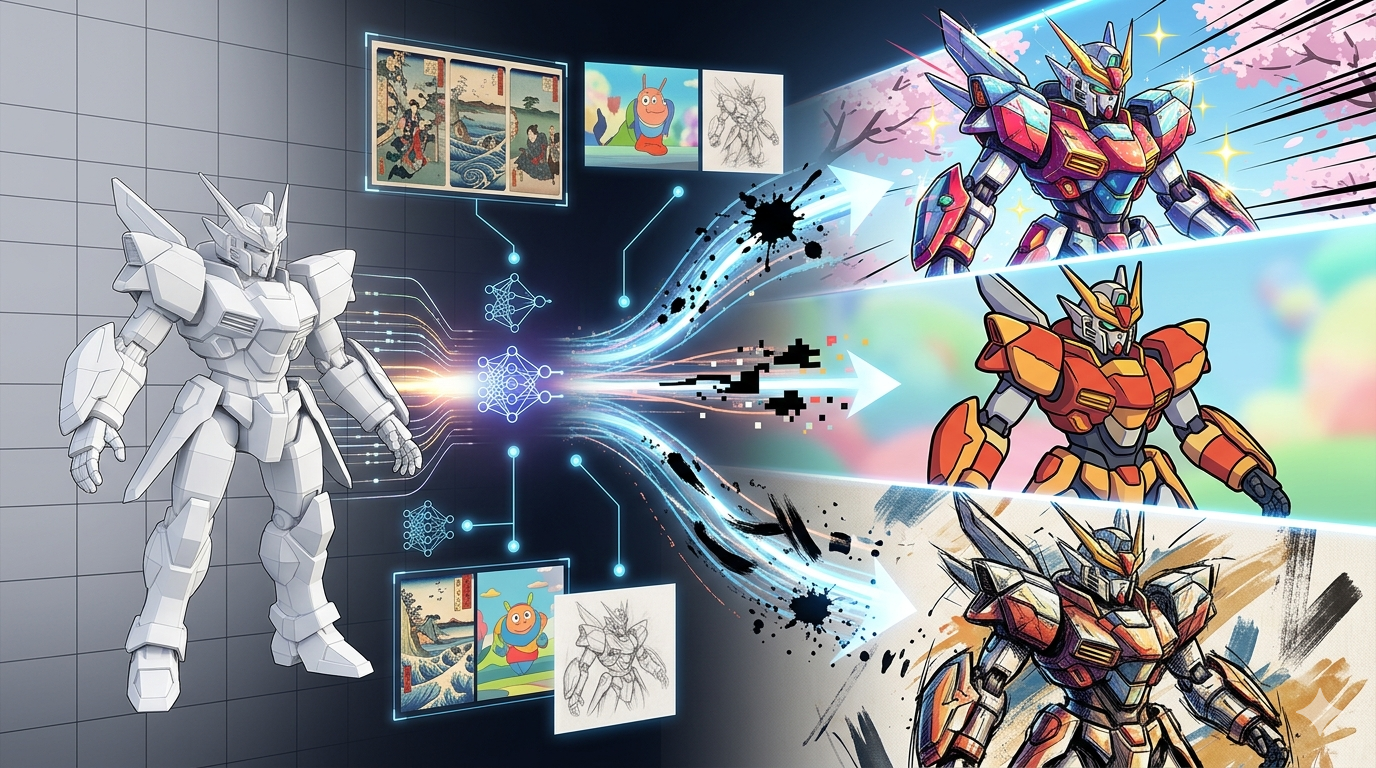
AI 3D Model Stylization: Cartoon, Anime & Toon Styles
artistic 3D rendering is a process that uses artificial intelligence to apply various artistic styles to 3D models. This exciting field of artistic 3D conversion allows creators to transform their models into cartoon, anime, toon, and other stylized formats, opening up new possibilities for artistic expression. This technology allows creators to transform their models into cartoon, anime, toon, and other stylized formats, opening up new possibilities for artistic expression. Several platforms, including Kaedim, Luma AI, and Masterpiece Studio, offer tools for AI-powered 3D model stylization, each with its own unique features and capabilities for this method.
What is AI 3D Model Stylization?
AI 3D model stylization, also known as style transfer for 3D, is a technique that uses artificial intelligence algorithms to transform the appearance of a 3D model. This process involves applying the artistic style of a source image or a predefined aesthetic to a target 3D model, resulting in a stylized version that retains the original model's geometry but adopts a new look. This can range from creating a cel-shaded 3D generator effect to mimicking the look of a painting or a sketch, all through the power of AI-driven style transfer.
The Core Idea Behind Artistic 3D Rendering
The fundamental concept behind artistic 3D rendering is to separate a model's content (its shape and structure) from its style (its texture, color, and overall aesthetic). By doing so, AI can learn the stylistic features of a reference and apply them to a new model. This is different from traditional 3D texturing, which often requires manual work and artistic skill. With AI, the process is automated, allowing for rapid experimentation and the creation of unique visual styles.
How Does AI 3D Model Stylization Work?
The technology behind 3D style transfer is rooted in deep learning, specifically in a type of neural network called a Generative Adversarial Network (GAN). A GAN consists of two competing neural networks: a generator and a discriminator. The generator creates stylized versions of the 3D model using style transfer for 3D models, while the discriminator tries to distinguish between the stylized models and real, artist-created models. Through this adversarial process, the generator becomes increasingly better at creating convincing and high-quality stylized models.
The Role of Style and Content Representations
To achieve style transfer, the AI needs to understand the difference between a model's style and its content. This is done by analyzing the features of the model at different layers of the neural network. The lower layers of the network tend to capture low-level features like edges and textures (the style), while the higher layers capture high-level features like shape and form (the content). By manipulating these feature representations, the AI can apply the style of one model to the content of another, which is the essence of this workflow.
Top Tools for AI 3D Model Stylization
Several platforms offer powerful tools for style conversion. Here?? a look at some of the top options available today, with an objective comparison of their strengths and weaknesses.
Hyper3D
Hyper3D offers a suite of tools for AI 3D model stylization, including the Rodin AI 3D model generator, which can be used for stylization. It's a versatile platform that also includes tools for editing and texture generation, making it a full solution for 3D artistic rendering.
Pros:
- Integrated platform with generation, editing, and texturing tools.
- Supports multiple export formats (STL, FBX, OBJ, GLB, USDZ).
- Offers various generation modes for different results.
Cons:
- The stylization features are part of a larger toolset, which might be more than what some users need.
- Can have a steeper learning curve due to the number of features.
Tripo AI
Tripo AI is a popular choice for its speed and ease of use in 3D stylization. It focuses on rapid model generation and stylization, making it accessible for beginners.
Pros:
- Very fast generation and stylization.
- Simple, user-friendly interface for this technique.
- Offers a free tier for users to try out the features.
Cons:
- Limited control over the stylization process.
- The quality of the generated models can be inconsistent.
Meshy AI
Meshy AI is known for its high-quality artistic 3D rendering and texturing capabilities. It's a strong contender for users who prioritize visual fidelity.
Pros:
- Excellent texture and model quality.
- Good for creating realistic and detailed models with 3D style transfer.
- Supports both text-to-3D and image-to-3D generation.
Cons:
- Can be slower than other tools.
- The interface can be complex for new users.
Spline
Spline is a 3D design tool that has incorporated this workflow features. It's a great option for designers who are already familiar with the Spline ecosystem.
Pros:
- Seamless integration with the Spline design workflow.
- Offers a wide range of stylistic options.
- Good for creating interactive 3D experiences with style conversion.
Cons:
- Primarily a design tool, so the AI features are not as extensive as dedicated AI platforms.
- May not be the best choice for users who are not already using Spline.
Step-by-Step Guide to Stylizing a 3D Model
Stylizing a 3D model with AI can be a straightforward process. Here?? a general guide to get you started, using a platform like Hyper3D as an example.
1. Choose Your 3D Model
First, you need a 3D model to stylize. You can either create one from scratch, use an existing model, or generate one using an image to 3D tool. For this tutorial on 3D style transfer, we'll assume you have a model ready to go.
2. Upload Your Model to the Platform
Next, upload your 3D model to your chosen stylization platform. Most platforms have a simple drag-and-drop interface for this. Once uploaded, the model will appear in your workspace.
3. Select a Style
Now for the fun part: choosing a style. AI stylization tools offer a variety of predefined styles, such as cartoon, anime, or voxel. You can also often use a reference image to transfer its style to your model. Experiment with different styles to see what works best for your model when using 3D stylization.
4. Apply the Stylization
Once you??e selected a style, apply it to your model. The AI will then process the model and apply the new style. This may take a few moments, depending on the complexity of the model and the style.
5. Refine and Export
After the stylization is complete, you can often make further refinements. For example, you might be able to adjust the intensity of the style or make changes to the model's texture with an AI texture generator. Once you??e happy with the result, you can export the stylized model in your desired format, such as FBX or GLB.
My First-Hand Experience with a Stylized 3D Generator
I decided to test out a stylized 3D generator for myself to see how easy it was to get started. I began with a simple 3D model of a car that I had created previously. I uploaded it to Hyper3D's platform and was immediately presented with a range of stylization options. I was particularly interested in the cartoon and cel-shaded styles, so I started with the cartoon filter.
Applying the style was as simple as clicking a button. Within about a minute, the AI had processed my model and presented me with a cartoon version of my car. The result was impressive ??the lines were clean, the colors were vibrant, and it had a distinct animated look. I then tried the cel-shaded style, which gave the car a more classic, hand-drawn appearance. I was able to switch between different generation modes, like 'Focal' and 'Speedy', which subtly altered the output. 'Speedy' was faster, as the name implies, but 'Focal' seemed to produce a more detailed result. After a few tweaks, I exported the final model as a GLB file to use in a web-based project. The entire process was intuitive and took less than 15 minutes from start to finish.
Advanced Tips for Better AI 3D Model Stylization
Once you've mastered the basics, here are a few advanced tips to take your this technique to the next level.
Combine Different Tools
Don't be afraid to use multiple tools in your workflow. For example, you could generate a base model in one tool, stylize it in another, and then use a third tool for texturing and final touches. This can give you more creative control and lead to more unique results with artistic 3D rendering.
Experiment with Custom Styles
Many platforms allow you to use your own images as style references. This opens up a world of possibilities. You can use paintings, photographs, or even abstract patterns to create one-of-a-kind styles for your 3D models.
Start with a High-Quality Model
The quality of your input model will have a big impact on the final result. A clean, well-proportioned model will generally produce a better stylized output than a messy or low-poly model. Take the time to prepare your model before you start the stylization process.
Frequently Asked Questions
What is the best software for AI 3D model stylization?
The best software really depends on your needs. For beginners, a tool like Tripo AI might be a good starting point due to its simplicity. For professionals who need more control and higher quality, a platform like Hyper3D or Meshy AI might be a better fit.
Can I use my own images for stylization?
Yes, many AI stylization tools allow you to upload your own images to use as style references. This is a great way to create custom and unique styles for your 3D models.
How does AI 3D model stylization differ from traditional texturing?
Traditional texturing is a manual process that requires artistic skill and can be time-consuming. 3D style transfer, on the other hand, is an automated process that uses artificial intelligence to apply styles to models. This makes it much faster and more accessible to a wider range of users.
What file formats are supported for stylized models?
Supported file formats vary by platform, but most tools support common formats like FBX, OBJ, GLB, and STL. Hyper3D, for example, supports all of these plus USDZ.
Is AI 3D model stylization free to use?
Some platforms offer free tiers or trials, but most professional-grade tools require a subscription. The cost can vary depending on the features and the amount of usage.