

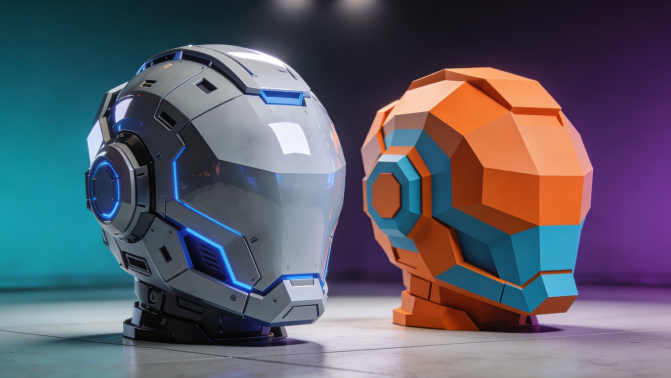
High Poly vs Low Poly 3D: When to Use Each
When you're starting out in 3D, the terms "high poly" and "low poly" get thrown around a lot. It can be confusing to figure out what they mean and, more importantly, when you should use each one. Whether you're creating assets for a game, a film, or a 3D print, understanding the difference between high poly and low poly is fundamental. This guide will break down everything you need to know, from the basics to advanced techniques, so you can make the right choice for your projects, which is relevant when working with high poly vs low poly.
What Are High Poly and Low Poly Models?: High Poly Vs Low Poly
In 3D modeling, every object is built from a mesh of polygons. Think of polygons as the tiny, flat surfaces that make up the skin of a 3D object. The terms "high poly" and "low poly" refer to the number of polygons in that mesh. A high poly model has a large number of polygons, which allows for a high level of detail and smooth, curved surfaces. A low poly model, on the other hand, has a much smaller number of polygons, resulting in a more stylized, blocky appearance and better performance, which is relevant when working with high poly vs low poly.
There's no magic number that defines a model as high or low poly. It's all relative and depends on the context. A model that's considered high poly for a mobile game might be considered low poly for a feature film. The key takeaway is that the polygon count directly impacts the model's appearance and how easily it can be rendered, which is relevant when working with high poly vs low poly.
High Poly Vs Low Poly: How It Works: The Technical Difference
The core difference between high poly and low poly modeling lies in the trade-off between detail and performance. , which is relevant when working with high poly vs low poly.
- High Poly: With more polygons, you can create incredibly detailed and realistic models. This is because the increased number of vertices and faces allows for more complex and nuanced surfaces. However, this detail comes at a cost. High poly models are computationally expensive to render, meaning they require more processing power and time to display. This makes them ideal for applications where visual quality is critical, such as in films, architectural visualizations, and high-end product renders.
- Low Poly: Low poly models are all about efficiency. With fewer polygons, they are much easier for computers to process and render in real-time. This makes them the go-to choice for video games, virtual reality (VR), and augmented reality (AR) applications, where smooth frame rates are essential for an immersive experience. The challenge with low poly modeling is to create compelling and recognizable shapes with a limited number of polygons.
Top Tools Compared
When it comes to creating 3D models, there are a number of great software options available. The best one for you will depend on your specific needs and budget. Here's a comparison of three of the most popular choices for both high and low poly modeling:, which is relevant when working with high poly vs low poly.
| Tool | Best For | Pros | Cons |
|---|---|---|---|
| Blender | All-around use, especially for individuals and small studios. | Free and open-source, large and active community, versatile toolset. | Can have a steep learning curve for beginners. |
| Autodesk Maya | Animation, rigging, and character modeling. | Industry standard for animation, powerful and flexible. | Expensive subscription, can be complex to learn. |
| Autodesk 3ds Max | Architectural visualization, game assets, and industrial design. | Strong modeling and rendering tools, large plugin ecosystem. | Expensive subscription, interface can feel dated. |
Blender
Blender is a powerhouse in the 3D modeling world. It's a free and open-source tool that can handle everything from modeling and sculpting to animation, rendering, and compositing. Because it's free, it's a fantastic option for freelancers, hobbyists, and small studios. The community is massive and incredibly supportive, so you'll find a wealth of tutorials and resources online. You can create both high and low poly models in Blender, and its sculpting tools are particularly impressive for creating detailed high poly meshes.
Autodesk Maya
Maya is the industry standard for 3D animation, and for good reason. It has an incredibly powerful and flexible toolset for rigging and character animation. While it excels at animation, it's also a very capable modeling tool for both high and low poly assets. Many large studios in the film and game industries use Maya as a core part of their pipeline. The main drawback of Maya is its cost, as it requires a subscription.
Autodesk 3ds Max
3ds Max is another industry-standard tool from Autodesk, with a strong focus on modeling, rendering, and architectural visualization. It has a solid set of modeling tools that are well-suited for creating both high and low poly game assets, as well as detailed architectural models. 3ds Max also has a large and mature plugin ecosystem, which can extend its functionality even further. Like Maya, 3ds Max is a subscription-based software.
Step-by-Step Guide: The High-Poly to Low-Poly Workflow
A common workflow in game development and other real-time applications is to create a high-poly model first and then create a low-poly version from it. This allows you to capture all the intricate details in the high-poly model and then "bake" them into a texture map that can be applied to the low-poly model. This gives you the best of both worlds: a detailed-looking model that is also performant.
Here?? a simplified step-by-step guide to this process:
1. Create the High-Poly Model: Start by creating a detailed, high-resolution model. Don't worry about the polygon count at this stage; focus on creating a visually impressive model with all the details you want.
2. Retopologize to Create the Low-Poly Model: Once you're happy with your high-poly model, it's time to create the low-poly version. This is done through a process called "retopology," where you create a new, simplified mesh that follows the contours of your high-poly model. Many 3D modeling programs have tools that can help automate this process.
3. UV Unwrapping: Next, you'll need to "unwrap" your low-poly model. This is the process of flattening out the 3D model's surface into a 2D image, which will serve as a template for your texture maps.
4. Bake the Details: This is where the magic happens. You'll use a process called "baking" to transfer the details from the high-poly model to a normal map. A normal map is a type of texture that tells the rendering engine how to simulate the lighting on a surface, creating the illusion of detail on a low-poly model.
5. Texture the Low-Poly Model: Finally, you can apply the baked normal map, along with other textures like color and roughness, to your low-poly model. The end result is a model that looks almost as detailed as the high-poly version but with a fraction of the polygons.
Advanced Tips
Once you have a good understanding of the basics, you can start to explore some more advanced techniques for working with high and low poly models.
For High-Poly Modeling:
- Focus on Clean Topology: Even though you have a lot of polygons to work with, it's still important to maintain clean topology. This will make your model easier to work with, especially if you plan to animate it or use it for sculpting.
- Use Sculpting for Details: For organic models, sculpting is a great way to add fine details like wrinkles, pores, and cloth folds. Most 3D modeling software now includes a solid set of sculpting tools.
- Optimize Your Workflow: High-poly modeling can be time-consuming, so it's important to optimize your workflow. Use tools like symmetry and instancing to save time, and make sure you're using a computer that can handle the high polygon counts.
For Low-Poly Modeling:
- Master Edge Flow: Good edge flow is crucial for low-poly modeling, especially for characters and other objects that will be animated. The edges of your polygons should follow the natural contours of the object, which will help it to deform correctly when it's animated.
- Be Strategic with Your Polygons: Every polygon counts in low-poly modeling, so be strategic about where you place them. Use more polygons in areas that need more detail, like the face of a character, and fewer polygons in areas that are less important.
- Use Normal Maps to Your Advantage: As we discussed in the step-by-step guide, normal maps are a powerful tool for adding detail to low-poly models. Learn how to bake and use normal maps effectively, and you'll be able to create stunning models with a low polygon count.
How to Make Low Poly Look High Poly
One of the most powerful techniques in 3D modeling is making a low-poly model look like a high-poly one. This is the secret behind most modern video games, and it's a great way to create detailed, performant assets. Here are a few tips:
- Bake Normal Maps: As we've already discussed, baking a normal map from a high-poly model is the most common way to add detail to a low-poly model.
- Use High-Quality Textures: A good set of textures can make a huge difference in the perceived detail of a model. Use high-resolution textures for color, roughness, and other material properties.
- Pay Attention to Lighting: Good lighting can help to accentuate the details in your model and make it look more realistic. Use a combination of direct and indirect lighting to create a sense of depth and atmosphere.
My First-Hand Experience
I remember one of my first big projects was creating a hero asset for a mobile game. It was a stylized, sci-fi weapon, and I was determined to make it look as cool as possible. I started in Blender, sculpting a super detailed, high-poly version of the weapon. I spent hours adding tiny details, like scratches and engravings, and I was really proud of how it turned out.
Then came the hard part: I had to create a low-poly version that would run smoothly on a phone. I tried to do it manually in Blender, but I was struggling to get the topology right. The model just didn't look as good as the high-poly version, and I was getting frustrated. A friend of mine who is a professional 3D artist suggested I try Maya for retopology. It was a bit of a learning curve, but Maya's retopology tools were a major shift. I was able to create a clean, optimized low-poly mesh that followed the contours of my high-poly model perfectly.
For another part of the project, I needed to create a bunch of background assets quickly. I didn't have time to model them all from scratch, so I decided to try a low poly 3D generator. I was amazed at how quickly I could create a variety of assets. They weren't as detailed as my hero asset, of course, but they were perfect for the background. I also experimented with an image to 3D tool to create some of the more organic shapes, which saved me a ton of time. In the end, I had a great-looking game that ran smoothly on mobile, and I had learned a valuable lesson about the importance of choosing the right tool for the job. For more complex assets, I still prefer the control of traditional modeling software, but for quick iterations and background elements, AI-powered tools can be a lifesaver. You can find more tools for 3D modeling on the hyper3d.ai website.
FAQ
What is a good polygon count for a low poly model?
There's no single answer to this question, as it really depends on the platform and the level of detail you're trying to achieve. For a mobile game, a low poly character might have between 1,500 and 5,000 polygons. For a PC or console game, that number could be closer to 10,000 to 20,000 polygons. The best approach is to research the technical specifications of your target platform and to test your models to see how they perform.
Can you use high poly models in video games?
While it's technically possible to use high poly models in video games, it's generally not a good idea. High poly models are very performance-intensive, and they can cause the game to run slowly or even crash. The standard practice in game development is to use low poly models with baked normal maps to create the illusion of detail.
Is it better to learn high poly or low poly modeling first?
This is a matter of personal preference, but many artists find it helpful to learn the fundamentals of low poly modeling first. This will teach you the importance of clean topology and edge flow, which are essential skills for any 3D modeler. Once you have a good understanding of the basics, you can then move on to high poly modeling and sculpting.
What is retopology?
Retopology is the process of creating a new, simplified mesh over the top of a high-poly model. This is a crucial step in the high-poly to low-poly workflow, as it allows you to create a clean, optimized mesh that is suitable for animation and real-time rendering.
How do I know if I need a high poly or low poly model?
The answer to this question depends on your project's requirements. If you're creating a model for a film, a high-end product render, or a 3D print, you'll probably want to use a high poly model to achieve the highest level of detail. If you're creating a model for a video game, a VR/AR application, or any other real-time application, you'll need to use a low poly model to ensure good performance.
Conclusion
Understanding the difference between high poly and low poly modeling is a fundamental skill for any 3D artist. By choosing the right approach for your project, you can create stunning visuals that are also performant and efficient. Whether you're a seasoned pro or just starting out, I hope this guide has given you a better understanding of when to use high poly vs low poly 3D. For more resources and tools to help you on your 3D modeling journey, be sure to check out the Hyper3D blog and our community forum.