

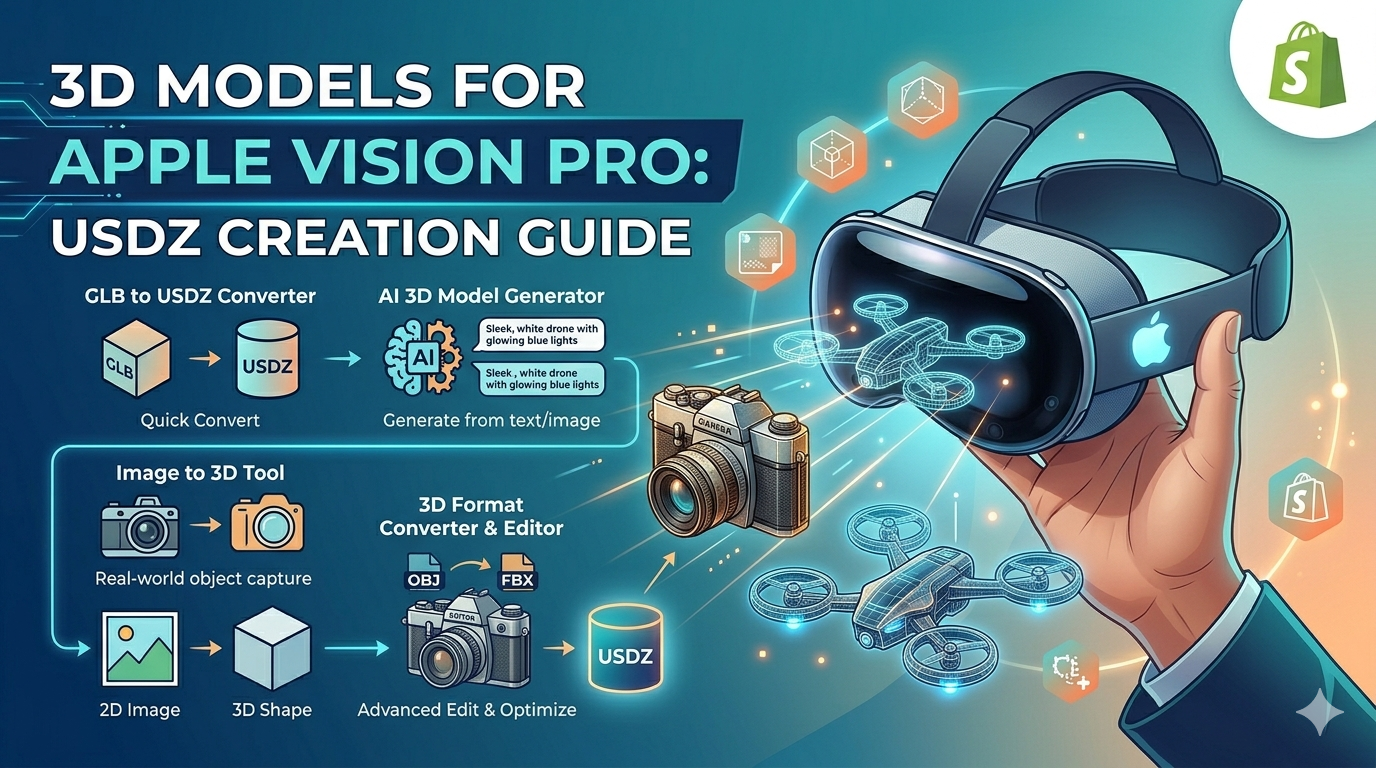
3D Models for Apple Vision Pro: USDZ Creation Guide
With the launch of the Apple Vision Pro, the demand for high-quality 3D models has skyrocketed. These models are the building blocks of immersive augmented reality (AR) experiences, allowing users to interact with virtual objects in their real-world environment. While various platforms and tools are available for 3D content creation, understanding the right format and creation process is key. This guide will walk you through creating apple vision pro 3d models, with a focus on the USDZ format.
What are USDZ files?
USDZ is a 3D file format developed by Apple in collaboration with Pixar. It is a container file that can store 3D models, textures, and animations in a single file. This makes it incredibly convenient for sharing and using 3D content across different Apple devices.
Why USDZ is the preferred format for Apple Vision Pro
Apple has made USDZ the standard format for AR experiences on its platforms, including the Vision Pro. This is because USDZ is optimized for performance and visual quality on Apple devices. The format is designed to be lightweight, allowing for fast loading times and smooth rendering of complex 3D models. This is crucial for the Vision Pro, where a smooth and responsive user experience is critical.
Benefits of using USDZ for AR experiences
Beyond its performance benefits, USDZ offers several other advantages for AR development. It supports Physically Based Rendering (PBR), which allows for the creation of highly realistic materials and lighting. This means that 3D models in USDZ can look incredibly lifelike when viewed in AR. Additionally, USDZ files can be easily shared and viewed on iPhones and iPads using the built-in Quick Look feature, making it simple to preview and share 3D content.
How to Create Apple Vision Pro 3D Models
Creating apple vision pro 3d models can be approached in several ways, depending on your skill level and the tools at your disposal. Here are some of the most common methods for generating USDZ files for your AR projects.
Using a GLB to USDZ Converter
For those who already have 3D models in the GLB format, a GLB to USDZ converter is the most straightforward solution. GLB (GL Transmission Format) is another popular 3D file format that is widely used in web-based and AR/VR applications. Many 3D modeling software and online marketplaces provide models in GLB format. A converter tool can quickly and easily transform these files into the USDZ format required by the Apple Vision Pro. This process is typically fast and preserves the quality of the original model.
using an AI 3D Model Generator
If you're starting from scratch, an AI 3D model generator like Rodin can be a powerful tool. These platforms use artificial intelligence to create 3D models from text descriptions or existing images. This is a great option for those who are not experienced 3D artists, as it allows you to generate complex models with simple inputs. You can describe the object you want to create, and the AI will generate a 3D model for you. Many of these tools can export directly to USDZ or to a format that can be easily converted.
From Image to 3D Model
Another innovative method for creating 3D models is using an image to 3D tool. These tools can take a 2D image and convert it into a 3D model. This is particularly useful for creating models of real-world objects. You can simply take a picture of an object with your phone and then use one of these tools to turn it into a 3D model. The quality of the resulting model will depend on the quality of the image and the sophistication of the tool, but it can be a very effective way to quickly create 3D content.
The Role of a 3D Format Converter
In many cases, you may find that you have a 3D model in a format other than GLB or that you need to make edits to a model before converting it. This is where a 3D format converter and editor like OmniCraft comes in. These tools can handle a wide variety of 3D file formats, allowing you to import a model in a format like OBJ or FBX, make any necessary adjustments, and then export it as a USDZ file. This gives you the flexibility to work with a wide range of 3D assets and ensure that they are optimized for the Apple Vision Pro.
My First-Hand Experience
As a 3D artist and developer, I was excited to start creating content for the Apple Vision Pro. I decided to try out a few of the methods I've discussed to see how they compared. My goal was to create a few simple models that I could use in an AR scene.
Using a GLB to USDZ Converter
I started with a GLB model of a vintage camera that I had downloaded from an online marketplace. I used a web-based GLB to USDZ converter to convert the file. The process was incredibly simple. I just had to upload the GLB file, and the converter did the rest. Within a few seconds, I had a USDZ file ready to go. I was impressed with the quality of the conversion. The textures and materials of the camera model were perfectly preserved. The only issue I encountered was that the model was a bit larger than I expected, so I had to scale it down in my AR scene. Overall, I found this to be a very efficient way to get existingpre-made apple vision pro 3d models
Exploring an AI 3D Model Generator
Next, I wanted to try creating a model from scratch using an AI 3D model generator. I decided to use Rodin to create a model of a futuristic-looking drone. I started by typing in a simple text prompt: "a sleek, white drone with four propellers and a glowing blue light." The AI generated a few different options for me to choose from. I picked the one that I liked the best and then made a few small adjustments to the design. I was able to change the color of the drone, add some extra details, and even adjust the lighting. Once I was happy with the model, I exported it as a USDZ file. The whole process took me less than 15 minutes. I was amazed at how quickly and easily I was able to create a high-quality 3D model. This is a great option for anyone who wants to create custom 3D models without having to learn complex 3D modeling software.
Frequently Asked Questions (FAQ)
What is the best way to view USDZ files?
The easiest way to view USDZ files is by using a dedicated USDZ file viewer. Many of these viewers are available as web-based tools or as apps for your phone or tablet. On Apple devices, you can also use the built-in Quick Look feature to view USDZ files directly in AR.
Can I use other 3D file formats with the Apple Vision Pro?
While the Apple Vision Pro is optimized for the USDZ format, it is possible to use other 3D file formats. However, you will need to convert them to USDZ before you can use them in your AR projects. This can be done using a 3D format converter or a dedicated conversion tool.
Do I need to be a professional 3D artist to create apple vision pro 3d models?
Not at all! With the rise of AI-powered 3D modeling tools, it has never been easier to create high-quality 3D models. These tools allow you to generate models from text descriptions or images, so you don't need to have any prior experience with 3D modeling software.
How can I optimize my 3D models for performance on the Apple Vision Pro?
To ensure that your 3D models perform well on the Apple Vision Pro, it is important to keep the file size as small as possible. This can be achieved by optimizing the geometry of the model, using efficient textures, and minimizing the number of materials. Many 3D modeling and conversion tools have built-in features for optimizing models for performance.
Where can I find pre-made apple vision pro 3d models?
There are many online marketplaces where you can find pre-made 3D models in the USDZ format. Some popular options include Sketchfab, TurboSquid, and CGTrader. You can also find free models on websites like Poly Haven and Free3D.
Objective Comparison of 3D Model Creation Methods
When it comes to ccreating apple vision pro 3d modelsPro, there is no one-size-fits-all solution. The best method for you will depend on your specific needs, skill level, and the complexity of the model you want to create. Here is an objective comparison of the different methods we have discussed:
| Method | Pros | Cons | Best For |
|---|---|---|---|
| AI 3D Model Generator | - Easy to use, no 3D modeling skills required - Fast, generates models in minutes - Great for brainstorming and rapid prototyping | - Less control over the final model - Quality can be variable - May not be suitable for highly detailed or complex models | Beginners, artists, and developers who need to create custom models quickly. |
| Image to 3D Converter | - Good for creating models of real-world objects - Can be very fast - Intuitive workflow | - Quality depends on the input image - May require cleanup and editing - Not suitable for creating models from scratch | Users who want to create 3D models of existing objects without having to model them manually. |
| GLB to USDZ Converter | - Simple and straightforward - Preserves the quality of the original model - Fast conversion times | - Requires you to have a 3D model in GLB format - Limited to conversion, no editing capabilities | Users who already have a library of GLB models and need to convert them to USDZ. |
| 3D Format Converter & Editor | - Supports a wide variety of 3D file formats - Allows for editing and optimization of models - Provides greater flexibility in your workflow | - Can be an extra step in the workflow - May have a learning curve depending on the software | Users who need to work with multiple 3D file formats and want to have more control over the final output. |
Conclusion
The Apple Vision Pro has opened up a new world of possibilities for AR experiences. By understanding the different methods for creating 3D models, you can start building your own immersive content for this exciting new platform. Whether you are a seasoned 3D artist or a complete beginner, there are tools available to help you bring your ideas to life. So, start exploring, experimenting, and creating the next generation of AR content.