

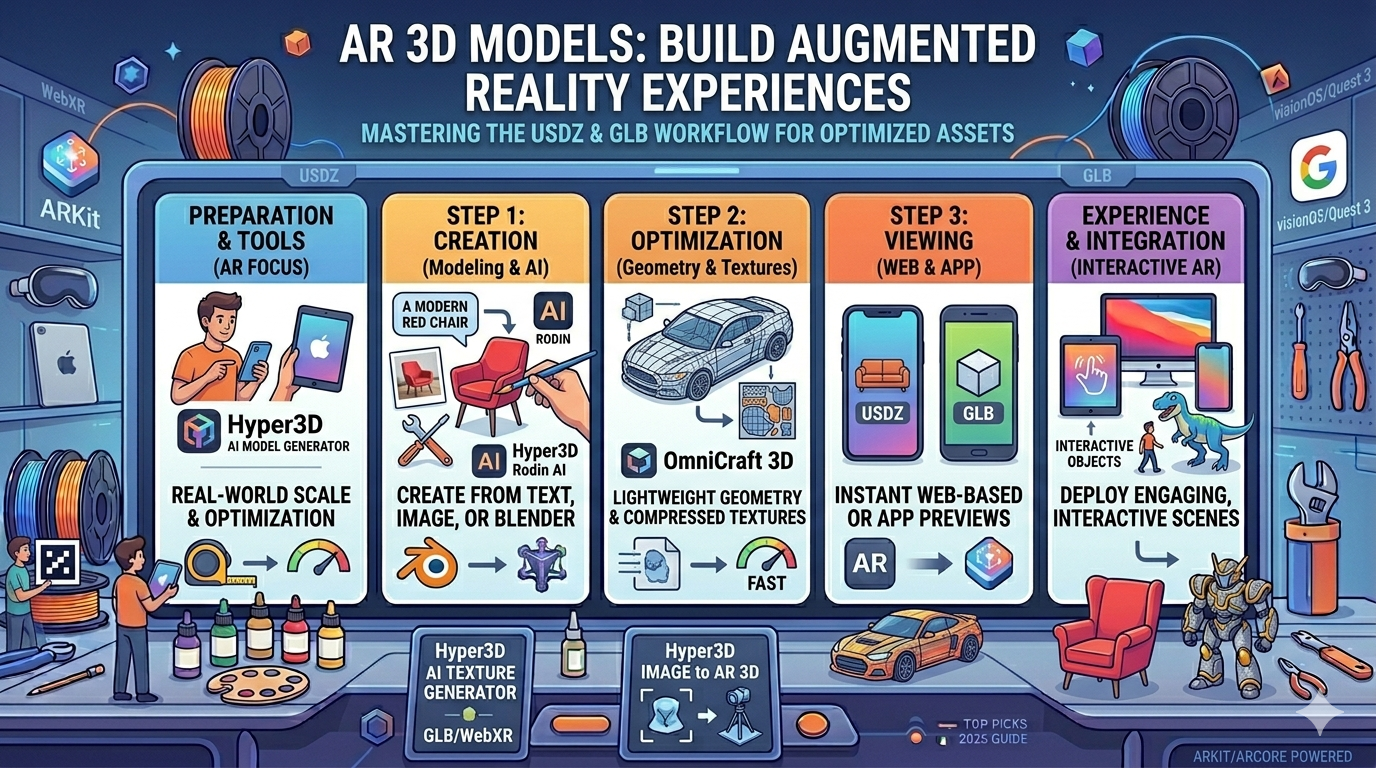
AR 3D Models: Build Augmented Reality Experiences
Augmented reality (AR) is changing how we interact with the digital and physical worlds. From trying on clothes virtually to visualizing furniture in your living room, AR experiences are becoming increasingly common. At the heart of these experiences lies the 3D model for AR, a digital asset that is optimized for smooth integration into our real-world environment. In this article, we'll explore what 3D models for AR are, how to create them, and how to view them on your devices. We'll also take a look at some of the tools available, including AI-powered solutions like an AR model generator.
What is an AR 3D Model?
An AR model is a three-dimensional digital representation of an object that has been specifically prepared for use in augmented reality applications. Unlike 3D models used in movies or video games, AR models need to be lightweight and efficient to ensure they can be loaded and rendered in real-time on mobile devices. Key characteristics of an AR-ready 3D model include:
- Real-World Scale: The model must be built to its actual size to appear correctly when placed in a real-world environment. For example, a 3D model of a chair should have the same dimensions as a physical chair.
- Optimized Textures: High-resolution textures can significantly increase file size. For AR, textures are often compressed and optimized to reduce load times without sacrificing too much visual quality.
- File Formats: The most common file formats for AR are USDZ for Apple devices and GLB for Android and web-based experiences. These formats are designed to be compact and efficient, making them ideal for AR applications.
How to Create AR 3D Models
There are several ways to create a 3D model for AR, each with its own advantages and disadvantages. The best method for you will depend on your skill level, budget, and the complexity of the model you want to create.
3D Modeling Software
For those with a background in 3D design, traditional modeling software like Blender, Maya, or 3ds Max offers the most control and flexibility. These powerful tools allow you to create highly detailed and customized models from scratch. However, they also have a steep learning curve and can be time-consuming to master. If you're new to 3D modeling, this might not be the best place to start.
Using an AR 3D Model Generator
Thanks to advancements in artificial intelligence, it's now possible to generate 3D models from text prompts or images. An AI 3D model generator like Hyper3D's Rodin can create a detailed 3D model in minutes, without any prior modeling experience. You can also use an image to 3D tool to convert a 2D image into a 3D model. These tools are a great option for beginners or for those who need to create a large number of models quickly.
Converting Existing 3D Models
If you already have a 3D model in a format like OBJ or FBX, you'll need to convert it to a web-friendly format like GLB or USDZ to use it in AR. A 3D format converter like Hyper3D's OmniCraft can handle this conversion for you. These tools often include features for optimizing the model's geometry and textures to ensure it performs well in AR.
Viewing and Experiencing AR 3D Models
Once you have your AR model, you'll want to view it in an augmented reality setting. There are two main ways to do this:
Web-Based AR
WebXR is a technology that allows you to experience AR directly in your web browser, without needing to download a separate app. This is the most accessible way to share AR content, as it works on both Android and iOS devices. For iOS users, a USDZ file viewer is essential for viewing AR content on the web.
Dedicated AR Apps
There are also a number of dedicated AR apps available, such as Sketchfab and Augment. These apps often provide a more feature-rich experience, with options for interacting with the models and sharing them with others. However, they do require users to download and install an app, which can be a barrier for some.
My First-Hand Experience with AR 3D Model Tools
As someone who is not a 3D artist, I was curious to see how easy it would be to create a 3D model for AR using AI-powered tools. I decided to try out Hyper3D's Rodin, an AI 3D model generator. I started with a simple text prompt: "a red armchair." Within a few minutes, Rodin had generated a detailed 3D model of a red armchair, complete with realistic textures and lighting. I was impressed with the quality of the model and how little effort it took to create.
Next, I wanted to see how I could use an existing 3D model. I downloaded a free 3D model of a car in OBJ format and used Hyper3D's OmniCraft, a 3D format converter, to convert it to GLB. The process was straightforward, and OmniCraft even gave me options to optimize the model's geometry and textures. The resulting GLB file was much smaller than the original OBJ file, and it loaded quickly in a web-based AR viewer.
Overall, I was very impressed with how easy it was to create and prepare an AR model using these tools. They have certainly lowered the barrier to entry for creating AR content, and I'm excited to see what else I can create.
Objective Comparison of AR 3D Model Tools
| Method | Pros | Cons | Best For |
|---|---|---|---|
| 3D Modeling Software | High control, unlimited creativity | Steep learning curve, time-consuming | Professional 3D artists |
| AI 3D Model Generator | Fast, easy to use, no experience needed | Less control over the final model | Beginners, rapid prototyping |
| 3D Format Converter | Optimizes existing models for AR | Requires an existing 3D model | Those with a library of 3D assets |
Frequently Asked Questions (FAQ)
What is the best file format for AR 3D models?
The best file format depends on the platform you are targeting. For iOS devices, USDZ is the preferred format. For Android and web-based AR, GLB is the most common format.
How can I view AR 3D models on my phone?
You can view AR 3D models on your phone using either a web-based AR viewer or a dedicated AR app. Web-based viewers are more accessible, as they don't require you to download an app.
Do I need to be a 3D artist to create AR experiences?
No, you don't need to be a 3D artist to create AR experiences. With the rise of AI-powered tools like AR model generators, anyone can create a 3D model from a simple text prompt or image.
What is the difference between AR and VR?
Augmented reality (AR) overlays digital information on the real world, while virtual reality (VR) creates a completely immersive digital environment. With AR, you can still see and interact with your physical surroundings.
Can I turn a photo into a 3D model for AR?
Yes, you can turn a photo into a 3D model for AR using an image to 3D tool. These tools use AI to analyze the photo and generate a 3D model based on its content.
Conclusion
The world of augmented reality is growing rapidly, and the 3D model for AR is at the center of it all. Whether you're a seasoned 3D artist or a complete beginner, there are now tools available to help you create and share your own AR experiences. From powerful modeling software to intuitive AI generators, the possibilities are endless. So why not dive in and start creating your own 3D models for AR today?