

# How to Make a 3D Model: 5 Methods from Beginner to Pro
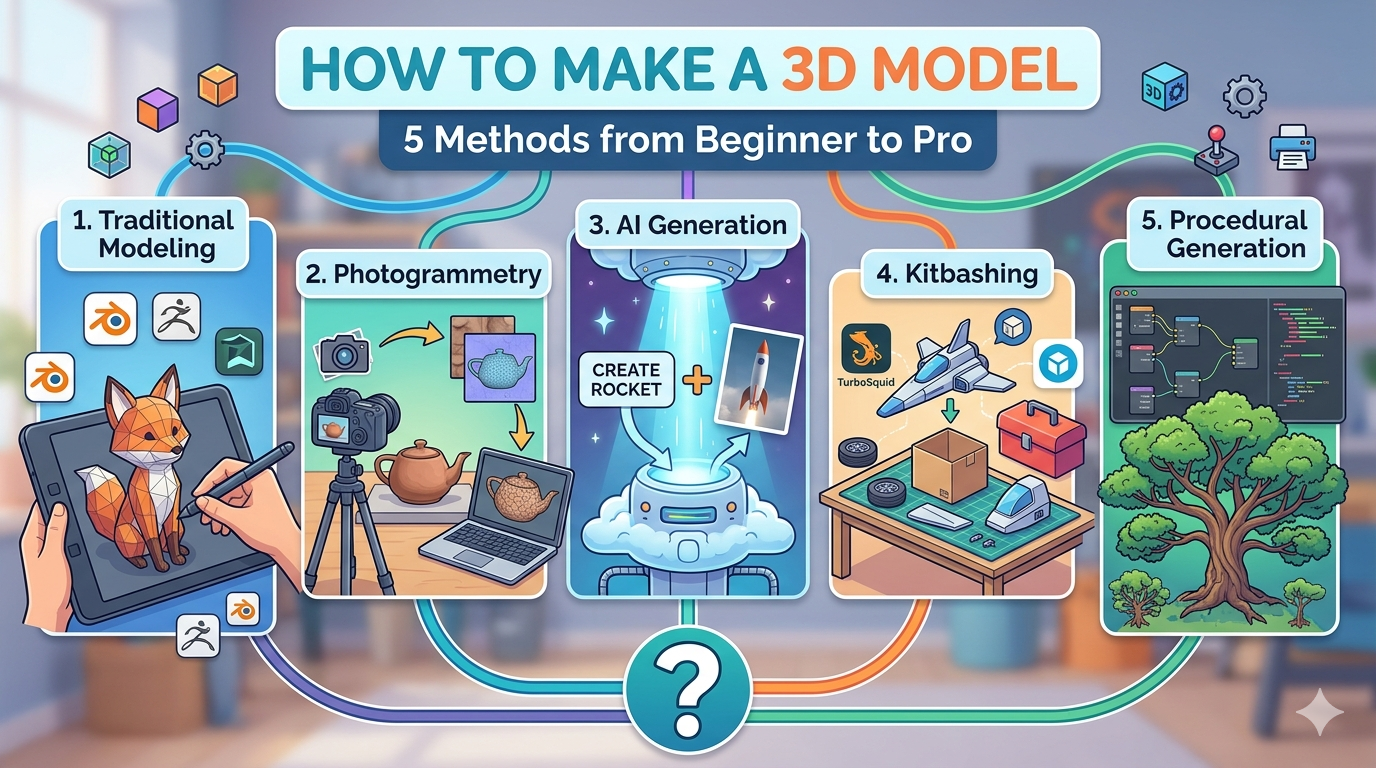
So, you want to learn how to make a 3D model. Whether you're creating a game asset, a product prototype, or a character, the world of 3D modeling can feel intimidating. There are many ways to create a 3D model, each with its own learning curve and tools. This article will guide you through them. This article will show you five different methods for making 3D models, from beginner-friendly tools to professional-grade software. We'll explore traditional 3D modeling, 3D scanning, AI-powered generation, kitbashing, and procedural generation. By the end, you'll have a clear understanding of which method is right for you and your project.
How to Make a 3D Model with Traditional Modeling
What is Traditional 3D Modeling?
Traditional 3D modeling is the process of creating a 3D object by manipulating polygons. It's like digital sculpting: you start with a basic shape and then push, pull, and extrude its vertices, edges, and faces to create the form you want. There are a few different approaches within traditional 3D modeling:
- Polygonal Modeling: This is the most common method, where you directly edit the polygons of the mesh. It's a versatile technique that can be used to create anything from low-poly game assets to high-resolution characters.
- NURBS Modeling: NURBS (Non-Uniform Rational B-Splines) are mathematical representations of curves and surfaces. This method is great for creating smooth, organic shapes and is often used in industrial design and for creating models that need to be very precise.
- Digital Sculpting: This is a more intuitive and artistic approach to 3D modeling. Instead of manipulating individual polygons, you use digital brushes to sculpt your model, much like you would with clay. This is a popular technique for creating detailed characters and creatures.
Popular 3D Modeling Software
There are a ton of 3D modeling software options out there, but here are a few of the most popular:
- Blender: This is a free and open-source 3D creation suite that has become incredibly popular in recent years. It's a powerful tool that can be used for everything from modeling and sculpting to animation and visual effects.
- Autodesk Maya: Maya is an industry-standard 3D animation software that is used in many professional film, television, and game development studios.
- Autodesk 3ds Max: 3ds Max is another popular choice for 3D modeling, animation, and rendering, especially in the architectural and product visualization industries.
- ZBrush: This is the go-to software for digital sculpting. It's known for its powerful and intuitive sculpting tools.
Pros and Cons of Traditional 3D Modeling
| Pros | Cons |
|---|---|
| Complete creative control | Steep learning curve |
| High level of detail possible | Can be very time-consuming |
| Versatile for many applications | Professional software can be expensive |
How to Make a 3D Model with Photogrammetry
How does Photogrammetry work?
Photogrammetry is the process of taking a series of photos of an object from every possible angle and then using specialized software to stitch those photos together into a 3D model. The software analyzes the photos to identify common points and calculate the object's shape and texture, creating a realistic 3D model.
Photogrammetry Tools
There are a number of photogrammetry tools available, ranging from free to professional-grade:
- Adobe Substance 3D Sampler: This is a powerful tool that can create 3D models from photos. It has an AI-powered masking feature that makes it easy to isolate your object from its background.
- RealityCapture: This is a professional-grade photogrammetry software that is known for its speed and accuracy.
- Meshroom: This is a free and open-source photogrammetry software that is a great option for beginners and hobbyists.
Pros and Cons of Photogrammetry
| Pros | Cons |
|---|---|
| Creates highly realistic models | Can be difficult to capture certain objects (e.g., shiny, transparent, or very dark objects) |
| Can be done with a regular camera or even a smartphone | Requires a lot of photos and can be a time-consuming process |
| Great for capturing existing objects | The quality of the model depends on the quality of the photos and the lighting conditions |
How to Make a 3D Model with AI
AI-powered 3D model generation is a new and exciting field that makes 3D modeling more accessible than ever. You can create a 3D model just by typing a few words or uploading an image.
Text-to-3D: Bringing Your Ideas to Life
Text-to-3D tools use artificial intelligence to generate 3D models from text prompts. You simply describe the object you want to create, and the AI will generate a 3D model for you. It's a bit like having a 3D artist at your beck and call. You can try it for yourself with Hyper3D's text to 3D model tool.
Image-to-3D: Turning 2D into 3D
Image-to-3D tools take a single 2D image and turn it into a 3D model. This is a great way to create 3D models from your own photos or from images you find online. Hyper3D also has an image to 3D tool that you can use to try this out.
Pros and Cons of AI-Powered Generation
| Pros | Cons |
|---|---|
| Incredibly fast and easy to use | The technology is still new and the results can be unpredictable |
| No prior 3D modeling experience required | You have less creative control than with traditional modeling |
| Great for brainstorming and rapid prototyping | The quality of the models can vary |
How to Make a 3D Model with Kitbashing
Kitbashing and using 3D marketplaces are all about using existing assets to create something new. This is a popular technique in the film and game industries for creating complex scenes and objects quickly.
What is Kitbashing?
Kitbashing is the process of taking parts from different 3D models and combining them to create a new model. For example, you could take the wings from a plane model, the body from a tank model, and the legs from a robot model to create a unique sci-fi vehicle. It's a fun and creative way to make new models without having to start from scratch.
Where to Find 3D Models
There are a number of online marketplaces where you can find 3D models to use in your projects. Some of the most popular include:
- Sketchfab: This is a huge repository of 3D models, many of which are available for free.
- TurboSquid: This is another popular marketplace for high-quality 3D models.
- CGTrader: This marketplace has a large selection of 3D models, including many that are optimized for 3D printing.
Pros and Cons of Using Pre-made Assets
| Pros | Cons |
|---|---|
| Saves a lot of time and effort | Can be expensive to purchase high-quality models |
| Access to a huge library of high-quality models | Your creations may not be entirely unique |
| Great for quickly populating scenes and creating prototypes | You need to be mindful of licensing and usage rights |
How to Make a 3D Model with Procedural Generation
Procedural generation is the process of using algorithms to create 3D models. Instead of manually creating every detail, you write a set of rules that the computer follows to generate the model. This technique can be used to create everything from vast landscapes to intricate objects.
What is Procedural Generation?
Procedural generation works by defining a set of rules or a procedure that generates the model. For example, you could write a script that generates a tree by starting with a trunk, then branching out into smaller and smaller branches, and finally adding leaves. By changing the parameters of the script, you can generate an infinite variety of trees.
Tools for Procedural Generation
- Houdini: This is a professional 3D animation and visual effects software that is known for its powerful procedural modeling tools.
- Blender's Geometry Nodes: Blender has a powerful node-based system called Geometry Nodes that allows you to create complex procedural models without writing any code.
Pros and Cons of Procedural Generation
| Pros | Cons |
|---|---|
| Can create vast and complex models with ease | Requires programming or scripting skills |
| Easy to create variations of a model | Can be difficult to create specific, detailed models |
| Great for creating large-scale environments and assets | The learning curve can be steep |
My First-Hand Experience: Creating a 3D Model with Hyper3D
To really understand how to make a 3D model, I decided to put Hyper3D's tools to the test. I wanted to create a custom avatar for a game I'm designing, and I was curious to see if I could do it without any prior 3D modeling experience. I started my journey on the Hyper3D website, and I was immediately impressed by the clean and intuitive interface.
I began by using the ChatAvatar tool to generate a base model for my character. I simply uploaded a photo of myself and the AI generated a 3D avatar that looked surprisingly like me. I was able to customize the avatar's features, including its hairstyle, eye color, and clothing. The process was incredibly simple and fun.
Next, I wanted to add some custom accessories to my avatar. I used the text to 3D model tool to generate a futuristic helmet. I typed in the prompt "a sleek, futuristic helmet with a glowing visor," and the AI generated a 3D model that was exactly what I had in mind. I was amazed at how quickly and easily I was able to create a custom 3D asset.
Finally, I used the OmniCraft tool to combine my avatar and the helmet into a single model. I was able to easily import both models into OmniCraft and position the helmet on the avatar's head. I also used OmniCraft to make some final adjustments to the model's materials and textures. The entire process was smooth and I was able to export my final model in the GLB format, which is perfect for use in my game.
Overall, I was incredibly impressed with my experience using Hyper3D. The tools are easy to use, even for a complete beginner like myself, and the results are surprisingly high-quality. I was able to create a custom 3D avatar in a matter of minutes, without having to learn any complex 3D modeling software. If you're looking for an easy and fun way to get started with 3D modeling, I highly recommend giving Hyper3D a try.
Objective Comparison of 3D Modeling Methods
| Method | Ease of Use | Cost | Quality | Best For |
|---|---|---|---|---|
| Traditional 3D Modeling | Difficult | Free to expensive | High | Artists and professionals who need complete creative control. |
| 3D Scanning | Medium | Free to expensive | High | Creating realistic models of real-world objects. |
| AI-Powered Generation | Easy | Free to paid | Medium | Beginners, rapid prototyping, and brainstorming. |
| Kitbashing | Easy | Free to expensive | Medium to High | Quickly creating complex models and scenes. |
| Procedural Generation | Difficult | Expensive | High | Creating large-scale environments and generating variations of a model. |
Frequently Asked Questions (FAQ)
What is the easiest way to learn how to make a 3D model?
For complete beginners, the easiest way to create a 3D model is to use an AI-powered tool like Hyper3D. With tools like text-to-3D and image-to-3D, you can create 3D models in minutes, without any prior experience.
How much does it cost to make a 3D model?
The cost of making a 3D model can vary widely depending on the method you choose. Traditional 3D modeling software can be expensive, but there are also free options like Blender. Photogrammetry can be done with a smartphone, but professional-grade scanners can be costly. AI-powered tools like Hyper3D offer free and paid plans.
How long does it take to make a 3D model?
Again, this depends on the method and the complexity of the model. A simple model might take a few minutes to create with an AI tool, while a complex character model could take a professional artist weeks or even months to create using traditional modeling software.
What are 3D models used for?
3D models are used in a wide variety of industries, including gaming, film, animation, architecture, product design, and 3D printing. They can be used to create everything from game assets and special effects to product prototypes and architectural visualizations.
Can I 3D print a model I create?
Yes, you can 3D print a model you create. However, you will need to make sure that your model is "watertight" and that it is exported in a format that is compatible with your 3D printer, such as STL or OBJ. Hyper3D's Rodin and OmniCraft tools can help you prepare your models for 3D printing.