

Interior Design 3D Models: AI-Powered Room Visualization
Gone are the days of struggling to visualize how a new sofa would look in your living room based on a flat, 2D image. Today, 3D models for interior design have transformed the way we approach home styling, offering a dynamic and immersive way to conceptualize and plan our spaces. With the advent of AI-powered tools like Hyper3D, Planner5D, and HomeByMe, creating stunningly realistic 3D representations of our dream rooms has never been more accessible.
What are Interior Design 3D Models?
An 3D model for interior design is a three-dimensional, digital representation of a physical space. It allows you to explore a room from every angle, experiment with different layouts, and test out various furniture and decor options before making any real-world commitments. This technology has been a staple for professional architects and designers for years, but now, it's making its way into the hands of everyday homeowners.
The Evolution from 2D to 3D
Traditionally, interior design relied on 2D floor plans and mood boards to convey ideas. While helpful, these methods often failed to capture the true essence of a space, leaving much to the imagination. The shift to 3D modeling has been a significant leap forward, providing a much more accurate and intuitive way to visualize and communicate design concepts. Now, with AI, we're seeing an even more dramatic evolution, with tools that can generate 3D models from simple text prompts or even a single photograph.
Benefits of Using 3D Models in Interior Design
The advantages of using 3D models in interior design are numerous. They allow for better spatial planning, helping you to avoid costly mistakes like buying furniture that's too big for the room. They also facilitate better communication between designers and clients, ensuring that everyone is on the same page. Also, the ability to experiment with different styles, colors, and materials in a virtual environment empowers you to make more confident design decisions.
How AI is Changing the Game for Interior Design 3D Models
Artificial intelligence is taking 3D modeling to a whole new level. AI algorithms can now generate complex 3D models in a fraction of the time it would take a human designer. This has opened up a world of possibilities for both professionals and hobbyists, making high-quality 3D visualization more accessible and affordable than ever before.
AI-Powered Generators: From Text to 3D
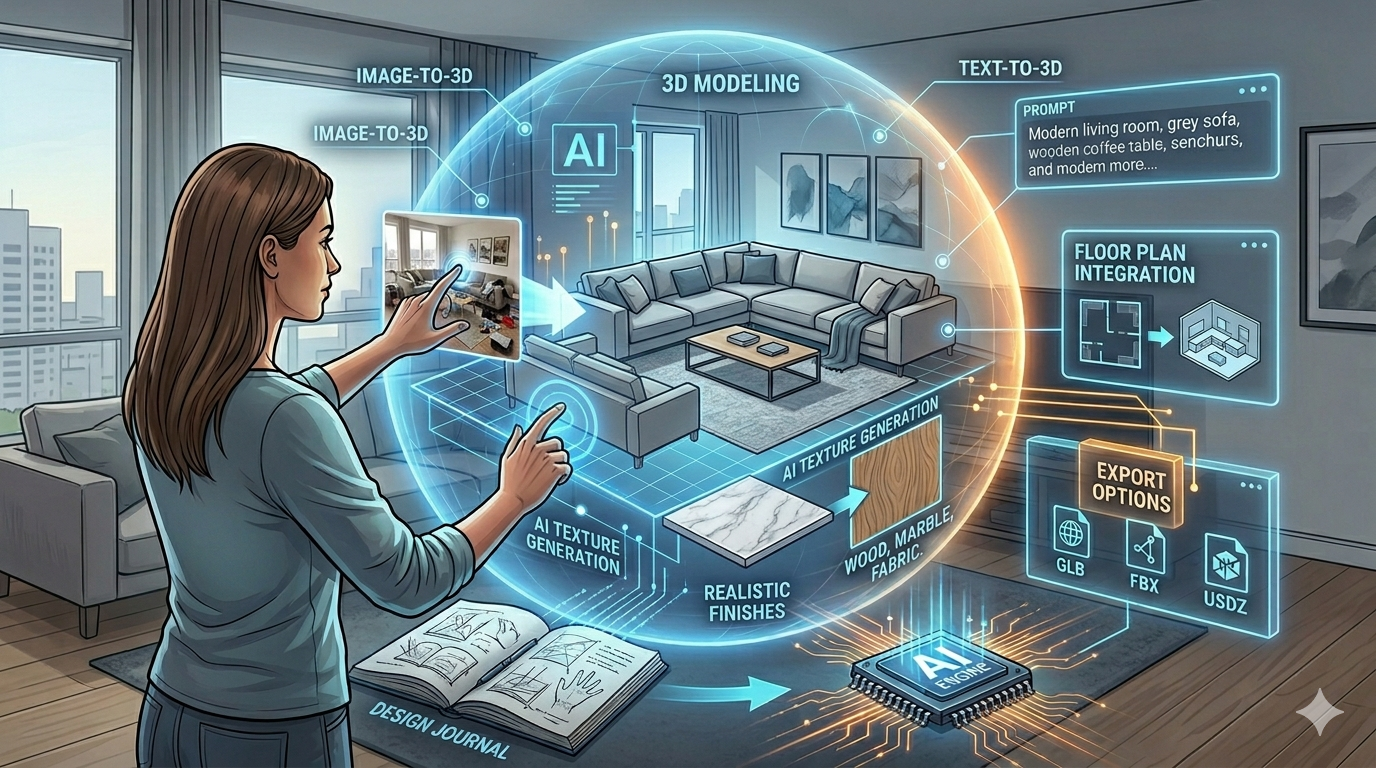
One of the most exciting developments in this field is the emergence of text-to-3D generators. Tools like Hyper3D's AI 3D model generator allow you to create a detailed 3D model simply by describing what you want in plain English. For example, you could type in "a modern living room with a grey sectional sofa, a wooden coffee table, and a large abstract painting on the wall," and the AI will generate a corresponding 3D scene. This technology is still evolving, but it holds immense potential for streamlining the design process.
Image to 3D: A New Reality
Another groundbreaking innovation is the ability to create a 3D model from a single image. With an image to 3D tool, you can take a photo of your room and have it instantly converted into a 3D model. This makes it incredibly easy to start experimenting with new design ideas without having to take detailed measurements or create a floor plan from scratch.
AI Texture Generation for Realistic Finishes
To create truly convincing 3D models, you need realistic textures. This is where AI texture generators come in. These tools can create smooth, high-resolution textures of any material imaginable, from wood and marble to fabric and leather. Hyper3D's AI texture generator is a great example of this technology in action, allowing you to add a new level of realism to your interior design visualizations.
My First-Hand Experience with AI Interior Design Tools
As someone who is passionate about both technology and design, I was eager to try out some of these AI-powered tools for myself. I started with Hyper3D's interior design 3D generator, and I was immediately impressed by its ease of use. I simply typed in a description of my ideal home office, and within minutes, I had a fully furnished 3D model that I could explore and customize.
I then decided to test out the image to 3D feature by taking a photo of my own, rather cluttered, living room. The results were surprisingly accurate, and I was able to quickly clear out the virtual clutter and start experimenting with new furniture arrangements. The ability to see my own space transformed in 3D was a truly eye-opening experience.
Objective Comparison of Interior Design 3D Model Tools
While Hyper3D is a powerful and versatile tool, it's not the only option on the market. To give you a more complete picture, I also spent some time exploring Planner5D and HomeByMe.
| Tool | Pros | Cons |
|---|---|---|
| Hyper3D | - Powerful AI features (text-to-3D, image-to-3D) - High-quality, realistic renders - Extensive library of 3D models and textures | - Can have a steeper learning curve for beginners - Some advanced features require a subscription |
| Planner5D | - Very user-friendly interface - Large and active community - Offers both 2D and 3D design modes | - Renders are not as realistic as Hyper3D - Limited free version |
| HomeByMe | - Easy to use, even for complete beginners - Fun, game-like interface - Good selection of brand-name furniture | - Less flexibility and customization options - Primarily focused on home users, not professionals |
Ultimately, the best tool for you will depend on your specific needs and skill level. If you're a professional designer or a serious hobbyist who wants the most powerful and flexible tool available, Hyper3D is an excellent choice. If you're a beginner who is just looking to have some fun and experiment with different design ideas, Planner5D or HomeByMe might be a better fit.
Getting Started with Your Own Interior Design 3D Model
Ready to start creating your own stunning interior design visualizations? Here are a few tips to help you get started:
Tips for Creating Stunning Visualizations
- Start with a clear vision: Before you start designing, take some time to think about the style and mood you want to create.
- Pay attention to lighting: Good lighting is key to creating realistic and inviting renders.
- Don't be afraid to experiment: The beauty of 3D modeling is that you can try out as many different ideas as you want without any real-world consequences.
Common Mistakes to Avoid
- Overcrowding the space: Just because you have an endless supply of virtual furniture doesn't mean you should use it all at once.
- Ignoring scale and proportion: Make sure that the furniture and decor you choose are the right size for the room.
- Forgetting about the details: Small details like plants, books, and artwork can make a big difference in the overall look and feel of your design.
FAQ about Interior Design 3D Models
What is the best software for 3D models for interior design?
There is no one-size-fits-all answer to this question. The best software for you will depend on your individual needs and budget. However, some of the most popular and highly-rated options include Hyper3D, SketchUp, and 3ds Max.
Can I create a 3D model of my room from a photo?
Yes, with the help of AI-powered tools like Hyper3D's image to 3D converter, you can now create a 3D model of your room from a single photograph.
How much does it cost to get a 3D model for interior design?
The cost of a 3D model can vary widely depending on the complexity of the project and the software you use. Some tools offer free basic plans, while others require a monthly or annual subscription.
Are AI-generated 3D models accurate?
AI-generated 3D models are becoming increasingly accurate, but they are not yet perfect. It's always a good idea to double-check the dimensions and make any necessary adjustments to ensure that your model is as accurate as possible.
What file formats are used for 3D models for interior design?
Common file formats for 3D models for interior design include OBJ, FBX, and GLB. If you need to convert between different formats, you can use a 3D format converter.
In addition to the tools mentioned above, there are also specialized generators for specific needs, such as an architecture 3D generator for larger-scale projects.
I also explored the various export options available in Hyper3D. The ability to export to formats like GLB and USDZ is particularly useful for AR/VR applications, allowing me to visualize my designs in a truly immersive way. The platform's integration with other Hyper3D tools, such as the AI texture generator and the 3D format converter, creates a smooth workflow for creating and refining 3D assets.
Exploring Other AI-Powered Features
Beyond the core modeling tools, I was also impressed by the platform's other AI-powered features. The character design generator and ChatAvatar AI avatar tools, while not directly related to interior design, showcase the breadth of Hyper3D's capabilities. These tools could be used to add realistic human figures to architectural visualizations, further enhancing their sense of scale and realism.