3D Models for Architecture: AI Design Tools Guide
Architects and designers are increasingly turning to digital tools to bring their visions to life. Using a 3D model for architecture projects allows for a level of detail and flexibility that was once impossible. The transition from hand-drawn sketches and physical mockups to dynamic, data-rich digital environments marks a significant evolution in the field. With the rise of AI-powered platforms, creating these models is more accessible than ever. Tools like Hyper3D, SketchUp, and Revit are changing how we approach architectural design, offering a range of features for everyone from solo practitioners to large firms.
The Growing Role of 3D Models in Architecture
Three-dimensional models have become a cornerstone of modern architectural practice. They serve as a digital canvas where ideas can be explored, refined, and presented with a high degree of realism. This shift from 2D drawings to 3D representations has had a significant impact on the entire design and construction workflow, from initial concept to final handover.
From Blueprint to Digital Twin
Traditionally, architectural plans were communicated through two-dimensional blueprints. While effective for conveying basic layout and dimensions, these drawings could be difficult for clients and other stakeholders to fully visualize. A 3D model for architecture bridges this gap, offering a clear and intuitive representation of the final structure. This "digital twin" can be explored from any angle, providing a much richer understanding of the space. It's a living model that can be updated throughout the project lifecycle, reflecting changes and incorporating new data. This creates a single source of truth for everyone involved.
Benefits for Design and Collaboration
The use of 3D models offers numerous advantages. They allow for rapid prototyping and iteration, enabling architects to test different design options quickly. This can lead to more innovative and efficient designs. For example, an architect can visualize how different materials will look in a specific lighting condition or how a change in the floor plan will affect the flow of the space. Also, these models facilitate better collaboration among team members, as everyone can work from a single, up-to-date source of truth. For more on how AI is shaping this space, you can explore an AI 3D model generator.
Creating Your First 3D Architectural Model
Getting started with 3D modeling for architecture can seem daunting, but many tools are designed to be user-friendly. The process generally involves a few key steps, from initial concept to final render. The learning curve can vary significantly depending on the software, but the fundamental principles remain the same.
Choosing the Right Software
There is a wide array of software available, each with its own strengths. Some are geared towards conceptual design, while others excel at detailed construction documentation. For those looking to convert existing images into 3D, an image to 3D tool can be a great starting point. If you are starting from scratch, a text to 3D model tool can be very helpful. Other popular choices include Rhino for complex geometries and 3ds Max for high-quality renderings. The right choice depends on your project's scale, complexity, and your personal workflow.
The Modeling Process
Once you have selected your software, the modeling process begins. This typically starts with creating the basic geometry of the building, such as walls, floors, and roofs. This is often referred to as "massing." From there, you can add more detailed elements like windows, doors, and furniture. Many platforms offer libraries of pre-made objects to speed up this process. The final stage involves applying materials and textures to the surfaces of your model to give it a realistic appearance. If you need to convert between different 3D formats, a 3D format converter can be an invaluable asset.
My First-Hand Experience with AI-Powered 3D Model Generators
I decided to test out a few AI-powered tools to see how they handle creating a 3D model for architecture. I focused on Hyper3D's offerings, specifically the architecture 3D generator and the interior design 3D generator. My goal was to create a simple residential structure and a furnished interior space to see how these tools perform in a real-world scenario.
For the exterior, I used the architecture generator with a text prompt describing a "modern two-story house with large windows, a flat roof, and a wooden facade." The initial result was impressive, capturing the overall form and style I had envisioned. I was able to refine the model by adding more specific details in subsequent prompts, such as "add a balcony on the second floor" and "change the window frames to black." The ability to quickly generate and iterate on design ideas was a significant advantage over traditional modeling methods.
Next, I moved on to the interior. Using the interior design generator, I prompted for a "minimalist living room with a sofa, coffee table, a large plant, and a fireplace." The tool generated a well-composed scene with realistic-looking furniture. I was particularly impressed with the quality of the textures and lighting. The tool even allowed me to specify the style of the furniture and the materials used. For those interested in creating custom textures, an AI texture generator can provide even more creative control.
Objective Comparison of Architectural 3D Modeling Tools
When it comes to creating a 3D model for architecture, there is no one-size-fits-all solution. The best tool for you will depend on your specific needs and workflow. Here?? a look at a few popular options:
| Tool | Pros | Cons |
|---|---|---|
| Hyper3D | Excellent for rapid prototyping and conceptual design. The AI-powered features make it easy to generate ideas quickly. The user interface is intuitive, making it accessible to beginners. | May not be as suitable for highly detailed construction documentation. The focus is more on visualization than on producing technical drawings. |
| Revit | A powerful BIM (Building Information Modeling) tool that is an industry standard for large projects. It excels at creating detailed and accurate models that can be used for construction. | Has a steep learning curve and can be expensive. The software is complex and requires significant training to master. |
| SketchUp | Known for its user-friendly interface, making it a great choice for beginners. It has a large library of pre-made models and a strong community. | Can be less precise than other tools for complex projects. It is primarily a surface modeler, which can be a limitation for some applications. |
Ultimately, Hyper3D is a strong contender for architects who want to accelerate their design process and explore creative possibilities. For those who need to produce detailed construction documents for large-scale projects, Revit remains a top choice. SketchUp is a solid all-around option for a wide range of users, from hobbyists to professionals.
The Future of Architectural Modeling
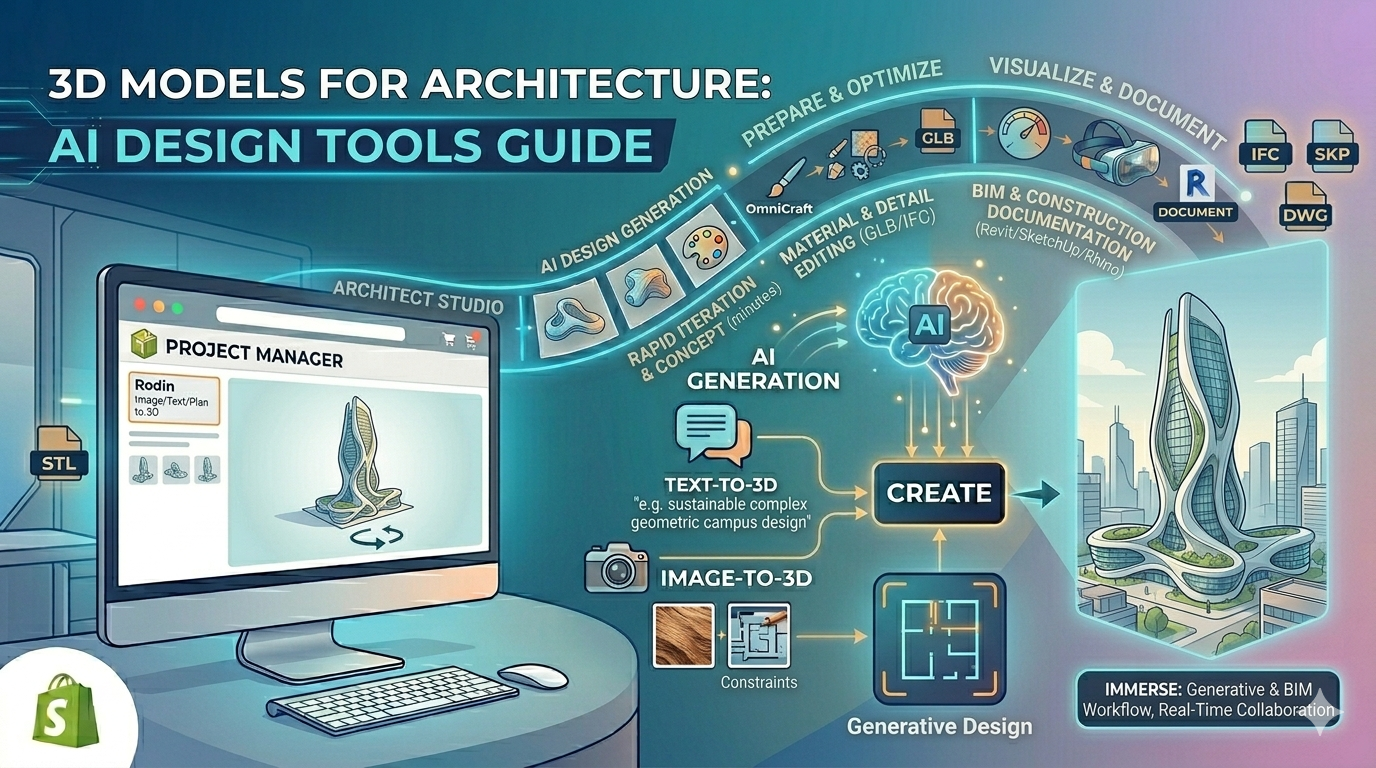
The world of architectural modeling is constantly evolving, with new technologies and techniques emerging all the time. One of the most exciting developments is the rise of generative design, where AI algorithms are used to create a wide range of design options based on a set of predefined constraints. This has the potential to revolutionize the way architects work, allowing them to explore a much wider range of possibilities than ever before. Another area of innovation is in real-time rendering, which allows architects and clients to experience a design in a fully immersive and interactive way. As these technologies continue to mature, the 3D model for architecture will become an even more powerful and essential tool.
FAQ: 3D Models for Architecture
What is the best software for creating a 3D model for architecture?
The best software depends on your needs. For quick, AI-powered design, Hyper3D is a great option. For detailed BIM, Revit is the industry standard. For ease of use, many people start with SketchUp.
How long does it take to create a 3D architectural model?
This can vary greatly depending on the complexity of the project and the tools you use. With AI generators, you can create a basic model in minutes. A highly detailed model for a large building could take weeks or even months.
Can I 3D print an architectural model?
Yes, many 3D modeling programs allow you to export your models in formats that are compatible with 3D printers, such as STL. This is a great way to create physical models for presentations.
What is the difference between a 3D model and a rendering?
A 3D model is the digital file containing the geometry of the object. A rendering is a 2D image created from the 3D model that shows what the object will look like with specific lighting, textures, and camera angles.
Can I use a 3D model for virtual reality?
Yes, many 3D models can be used in virtual reality applications. This allows clients to experience the space in a fully immersive way before it is built. Some tools, like Hyper3D's vector to 3D converter, can help prepare models for this purpose.
What are the most common file formats for a 3D model for architecture?
Common file formats include DWG, DXF, and RVT for Autodesk products, SKP for SketchUp, and open formats like IFC, OBJ, and FBX. The best format depends on the software you are using and how you plan to share the model.
How can I create a 3D model of a character for my architectural visualization?
For creating characters, you can use a specialized tool like a character design 3D model generator. This can help you create realistic people to populate your scenes and make them feel more alive.