Best AI 3D Model Generators Ranked 2025
The world of 3D content creation is changing fast. Just a few years ago, making a 3D model required years of training and complex software. Now, AI is making it possible for anyone to generate 3D assets just by typing a few words or uploading an image. This has opened up 3D creation to game developers, product designers, architects, and hobbyists who previously found it out of reach.
This is where best ai 3d model generator tools really show their value.
But with so many new tools popping up, it's hard to know which is the best AI 3D model generator for your needs. Platforms like Hyper3D, Meshy, and Tripo are all competing to turn your ideas into three-dimensional reality, but they each have different strengths. Some are built for speed and rapid prototyping, while others focus on creating high-quality, production-ready models with clean geometry. Choosing the right one depends entirely on what you plan to build.
This guide breaks down the top contenders in the AI 3D modeling space. We'll compare their features, look at their pros and cons, and help you decide which tool is the right fit for your specific project, whether you're making assets for a game, prototyping a product, or just exploring the creative possibilities of AI.
For anyone exploring best ai 3d model generator options, this matters.
Best Ai 3D Model Generator: What is an AI 3D Model Generator?
An AI 3D model generator is a tool that uses artificial intelligence, particularly deep learning models, to create three-dimensional models from various inputs. Instead of manual modeling in software like Blender or Maya, you can provide a text description (text-to-3D), a 2D image (image-to-3D), or even a short video, and the AI will interpret the input to produce a 3D mesh. These tools are designed to automate the most time-consuming parts of the 3D creation process, making it accessible to a much wider audience.
The best ai 3d model generator workflow makes this straightforward.
Best Ai 3D Model Generator: The Core Technology
At their heart, these generators rely on complex neural networks trained on vast datasets of 3D shapes and their corresponding text or image descriptions. Early models produced rough, often unusable geometry, but modern approaches like NeRFs (Neural Radiance Fields), LRMs (Large Reconstruction Models), and advanced diffusion models are now capable of generating models with detailed textures and clean topology suitable for professional use.
Why is this a Big Deal?
The main advantage is speed. A process that once took a skilled artist hours or days can now be accomplished in minutes. This allows for rapid prototyping and iteration. For indie game developers, architects, and product designers, this means they can visualize ideas almost instantly without a large budget or a dedicated 3D modeling team. It also lowers the barrier to entry, allowing creators from all backgrounds to bring their 3D visions to life.
How Do AI 3D Model Generators Work?
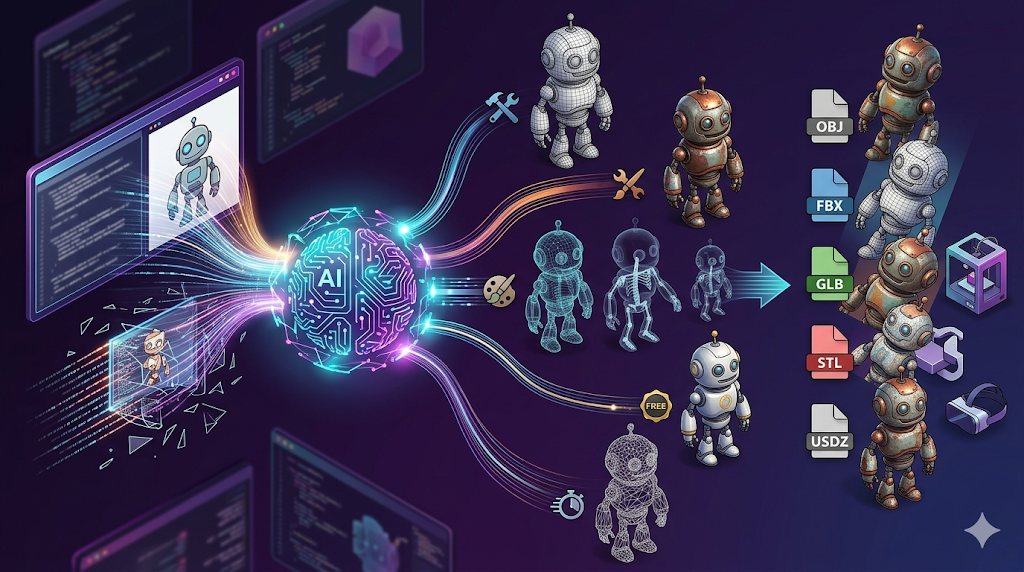
The process is simpler than it sounds. You start by providing an input??ither a text description (text-to-3D) or a 2D image (image-to-3D). The AI then analyzes this prompt and generates a 3D model based on its vast training data. This can take anywhere from a few seconds to a couple of minutes. Finally, you can refine the model using built-in tools for texturing or mesh editing before exporting it in a standard format like OBJ, FBX, or GLB for use in your project.
Top AI 3D Model Generators Compared
With the landscape of AI 3D model generation tools growing crowded, a few platforms have emerged as the top contenders. Each offers a unique set of features and excels in different areas. Here?? a direct comparison of the leading tools to help you find the best AI 3D model generator for your specific needs.
| Tool | Best For | Top Strength | Key Limitation |
|---|---|---|---|
| Meshy AI | Texturing & UX | Best-in-class texturing engine | Geometry can be rough on complex objects |
| Tripo AI | Game Dev Pipelines | Fast generation and auto-rigging | STL exports can have issues with normals |
| Hyper3D (Rodin) | Clean Topology & Avatars | Produces the cleanest, most production-ready geometry | More specialized for characters and objects |
| Tencent Hunyuan3D | Budget-Conscious Users | Generous free tier (20 generations/day) | Interface is in Chinese (requires translation) |
| Luma AI (Genie) | Rapid Prototyping | Extremely fast for initial concepts | Creates "triangle soup" topology needing cleanup |
Meshy AI
Meshy AI is best for artists who prioritize texturing and a polished user experience. Its main strength is its best-in-class AI texturing engine, which produces beautiful PBR materials from text prompts. However, this focus on textures comes with a trade-off: the underlying geometry can be rough on complex objects and may require cleanup.
Tripo AI
Tripo AI is the go-to for game developers needing assets quickly. It?? incredibly fast and includes game-dev-friendly features like auto-rigging. While its speed is a major plus, its STL exports can sometimes have issues, and it may sacrifice some geometric detail for that speed.
Hyper3D (Rodin)
Hyper3D's Rodin is the leader for anyone needing clean, production-ready geometry. It consistently produces the highest quality meshes, making it ideal for character artists and professionals. Its all-in-one OmniCraft ecosystem provides a seamless workflow from generation to export. The trade-off for this quality is a focus on realistic and structured objects over highly stylized props.
Tencent Hunyuan3D
Tencent's Hunyuan3D is the best option for budget-conscious users. It offers a very generous free tier of 20 high-quality generations per day. The main hurdle is its Chinese-language interface, which requires browser translation to use effectively.
Luma AI (Genie)
Luma AI's Genie is built for rapid prototyping. It's incredibly fast, making it great for initial concepts and 3D sketches. However, this speed results in messy "triangle soup" topology that is not production-ready and requires significant cleanup.
My First-Hand Experience with Hyper3D Rodin
To get a real feel for how these tools work, I took Hyper3D's Rodin for a spin. My goal was to test its text-to-3D capabilities and see if the geometry lived up to its reputation. The task was to create a simple character asset: "a cute, cartoon-style robot with a single large eye."
Upon loading the tool, I was met with a clean, dark-themed workspace. The main input area is front and center, with the OmniCraft sidebar on the left offering a suite of tools like the AI Texture Generator and Mesh Editor. I typed my prompt into the text box and hit the prominent GENERATE button.
I first tried the Speedy mode. As promised, a model appeared in under a minute. The result was a good first draft; the overall shape was there, but some of the details were a bit soft. It was a perfect starting point for rapid iteration.
Next, I ran the same prompt using the Focal mode. This took a bit longer, around two minutes, but the difference in quality was immediately noticeable. The edges were sharper, the surfaces were smoother, and the overall structure of the robot felt much more solid and defined. The geometry was incredibly clean, with well-organized polygons that would be easy to work with in another program. This is what users mean when they talk about "clean topology."
After generation, I explored the OmniCraft tools. I quickly applied a metallic texture using the AI Texture Generator and then exported the model. The interface offered several verified formats: STL, FBX, OBJ, GLB, and USDZ. I chose GLB for its balance of quality and file size. The entire process, from prompt to a fully textured and exported model, took less than ten minutes. It?? a complete, self-contained ecosystem that lives up to its promise of an all-in-one workflow.
Your First AI-Generated 3D Model in 4 Steps
Ready to try it yourself? Here?? a simple workflow:
1. Choose a Tool & Write a Prompt: Select a generator that fits your needs??ike Hyper3D for clean models or Luma AI for speed. Write a descriptive prompt, like "a sci-fi helmet with glowing blue visor."
2. Generate the Model: Select a generation mode (e.g., Speedy or Default) and click generate. Your model will appear in the viewer in a minute or two.
3. Refine and Texture: Use the platform?? built-in tools to inspect the model, apply AI-generated textures, and make any necessary mesh adjustments.
4. Export: Export your finished model in the format you need: FBX for games, STL for 3D printing, or GLB for web and AR.
Use Cases and Applications for AI-Generated 3D Models
The rise of AI 3D model generators is not just a technical curiosity; it's a practical shift that is reshaping workflows across many industries. By dramatically speeding up asset creation, these tools are unlocking new possibilities.
Game Development
For indie developers and even large studios, creating the vast number of assets required for a modern video game is a major bottleneck. An AI 3D model generator can produce props, environmental objects, and character bases in a fraction of the time. This allows developers to prototype levels faster and populate game worlds with more variety and detail.
Product Design and E-Commerce
Visualizing a product before it's manufactured is a critical step in design. With an image to 3D tool, designers can turn sketches or photos into 3D models to evaluate their form and function. In e-commerce, this technology allows businesses to create 3D representations of their products for interactive online viewing, enhancing the customer experience.
Architecture and Real Estate
Architects can use AI to quickly generate 3D models of buildings and furniture to create immersive visualizations for clients. This helps stakeholders experience a space before construction begins, making it easier to communicate design intent and make informed decisions.
3D Printing and Hobbyists
For hobbyists and makers, AI generators are a gateway to 3D printing. You can design custom miniatures for tabletop games, create replacement parts for household items, or simply bring your creative ideas into the physical world. Tools that export directly to STL, like Hyper3D, are particularly useful for this, and you can use an STL file viewer to check your model before printing.
AR/VR and the Metaverse
Augmented and virtual reality applications require a massive amount of 3D content. AI generators provide a scalable way to create assets for these immersive experiences, from virtual furniture and clothing to entire digital worlds. Using a format like GLB is key, and a GLB-to-USDZ converter can help ensure compatibility with Apple's AR ecosystem.
Frequently Asked Questions (FAQ)
What is the best AI for text-to-3D?
There isn't a single "best" tool, as it depends on your goal. For the absolute highest quality geometry and clean topology, especially for characters, Hyper3D's Rodin is a top choice. If your priority is the best possible texturing on your model, Meshy AI often produces the most impressive results. For rapid prototyping where speed is the most important factor, Luma AI's Genie is excellent.
Can I use an AI 3D model generator for free?
Yes, several platforms offer free options. Tencent Hunyuan3D is one of the most generous, providing 20 high-quality generations per day at no cost, though its interface requires translation. Tripo AI also has a good free credit system that allows you to create a number of models before needing to pay.
What file formats do AI 3D generators export?
Most generators export in standard, widely-supported formats. The most common are OBJ, FBX, GLB/GLTF, and STL. Your choice will depend on your use case. For example, use FBX for game development, STL for 3D printing, and GLB for web or AR applications. Some platforms also offer tools like an FBX-to-OBJ converter for added flexibility.
How good is the quality of AI-generated 3D models?
The quality has improved dramatically and is now at a professional level for many use cases. Tools like Hyper3D Rodin can produce models with topology that is clean enough for animation and game engines. However, the quality can vary. Some tools, particularly those focused on speed, may produce messy geometry ("triangle soup") that requires manual cleanup in software like Blender.
Do I need to know 3D modeling to use these tools?
No, and that's their biggest advantage. An AI 3D model generator is designed for users without a background in traditional 3D modeling. As long as you can write a descriptive text prompt or provide a clear image, you can create a 3D model. This accessibility is what makes these tools so powerful for designers, developers, and hobbyists alike.